
 Signals
 Our Data
 RevOps
 Human Verification
 Comprehensive Support
 Real Mobile Numbers
 Research on Demand
 Guided Transitions
 Contact Data
 Intent Data
 Company Technographics
 Company Firmographics
 Sales
Sales Marketing
 RevOps

Securing direct communication with CEOs and high-level executives is paramount for B2B success. However, obtaining accurate contact information can be a daunting task. This comprehensive guide will equip you with effective strategies and tools to unlock the elusive world of CEO emails. From leveraging advanced sales intelligence platforms to harnessing the power of online research, we’ll explore proven methods to connect with key decision-makers.
How to Find CEO Email Address (and Phone Numbers) Effectively?
1. Sales Intelligence Tools: The Scalable Approach
Sales intelligence tools are the most efficient way to find executive contact data at scale. These platforms maintain massive, frequently updated databases that allow you to skip the guesswork.
Verified Data Providers: Tools like SalesIntel, ZoomInfo, and Cognism provide “human-verified” data. For example, SalesIntel uses a team of over 2,000 researchers to verify contacts every 90 days, ensuring approximately 95% accuracy—which is critical when reaching out to high-value targets like CEOs.
Direct Dials & Mobile Numbers: Platforms like SalesIntel, Lusha and Apollo.io specialize in providing direct mobile numbers, helping you bypass the corporate switchboard entirely.
Real-Time Enrichment: Many of these tools offer Chrome extensions like Revdriver (by SalesIntel) that allow you to find a CEO’s email and phone number directly while viewing their LinkedIn profile or company website.
Intent & Signals: Advanced platforms (like SalesIntel’s Signal360) go beyond contact info by tracking “buying signals” such as recent funding rounds or leadership changes so you know when it’s the right time to reach out.
Pros and Cons of Sales Intelligence Tools
Pros
- High Efficiency: Enables rapid prospecting and lead generation at a scale that manual research cannot match.
- Higher Deliverability: Human-verified data significantly reduces email bounce rates and ensures you reach the correct decision-maker.
- Direct Access: Mobile numbers and direct dials allow you to bypass gatekeepers (like executive assistants) and speak directly to CEOs.
- Actionable Insights: Intent signals provide the context needed to reach out when a company is actively looking to buy, increasing conversion rates.
- Seamless Workflow: Chrome extensions and CRM integrations allow you to find and save contact info without leaving your browser.
Cons
- Subscription Costs: Access to high-quality, verified data usually requires a significant financial investment compared to free manual methods.
- Learning Curve: Advanced features like intent tracking and automated workflows may require time and training to master.
- Data Decay: Even with high accuracy, B2B data changes rapidly (people change jobs, companies merge), meaning no database is 100% perfect at all times.
- Setup Effort: Initial configuration and integration with your existing sales tech stack (CRM/MAP) can take time to execute correctly.
2. How to Use Google Search to Find CEO Emails?
To find CEO emails using Google, employ advanced Boolean search operators like ‘ “CEO email” AND [Company Name] ‘ to pinpoint contact details within indexed data. This strategy targets press releases and business directories to uncover specific information that links you directly to the right executive contacts.
Google remains a powerful ally in the quest for contact details. Leveraging advanced search operators and strategic keywords can help you unearth relevant information about CEOs and decision-makers. Explore online publications, press releases, and business directories to discover valuable nuggets of information that can lead you to the right individuals.
it’s essential to use advanced techniques to find CEO emails effectively:
- Use Boolean search operators: “CEO email” AND [Company Name]
- Explore Google’s “People Also Ask” section for related queries
- Leverage Google’s image search to find CEO photos, which may lead to contact pages
Pros:
- Free Access: Google is a free and easily accessible search engine, making it a cost-effective option.
- Extensive Information: Google can provide a wealth of information beyond just contact details, including news articles, press releases, and industry insights.
Cons:
- Information Overload: Sorting through vast amounts of information on Google can be time-consuming, and there’s a risk of getting overwhelmed by irrelevant details.
- Data Accuracy: The information found on Google may not always be up-to-date or accurate, as it relies on publicly available data.
Social media has become an invaluable resource for professional networking. Platforms like LinkedIn provide a wealth of information about business professionals, including their current positions, affiliations, and contact details. Don’t hesitate to reach out through these channels, as many executives actively engage in networking on platforms like LinkedIn.
Social platforms, especially LinkedIn, can be goldmines for CEO emails:
- Utilize LinkedIn’s advanced search features to identify CEOs
- Look for “Contact Info” sections on CEO profiles
- Engage with CEO content to build rapport before requesting contact information
Pros:
- Professional Networking: Social media platforms, especially LinkedIn, offer opportunities for direct professional networking with B2B decision-makers.
- Insightful Profiles: Social media profiles often provide insights into a person’s professional background, skills, and endorsements.
Cons:
- Limited Contact Information: While platforms like LinkedIn may offer contact information, not all professionals share their email addresses or phone numbers publicly.
- Time-Consuming Outreach: Establishing connections through social media may take time, and responses are not guaranteed.
Pro Tip: Finding LinkedIn Profiles via Company Domains
To find a CEO or senior leader’s LinkedIn profile using only a company domain, use this specific Google search operator:
site:linkedin.com/in/ “Company Name” AND (“CEO” OR “Founder”)
This bypasses LinkedIn’s internal search limitations and helps you identify the exact profile associated with a specific corporate entity. Once identified, you can use the SalesIntel RevDriver extension to reveal the verified email directly from that profile page.
4. How Networking Events a Direct Way to Get CEO Emails?
Participating in industry events and conferences is an excellent way to connect with key B2B decision-makers face-to-face. During these events, you may have the opportunity to exchange business cards or gather contact information directly. Additionally, industry-specific gatherings often provide platforms for virtual networking, allowing you to connect with executives on a global scale.
Industry conferences and networking events offer unique opportunities to obtain CEO emails directly:
- Prepare a targeted list of CEOs attending the event
- Use event apps to schedule meetings or exchange contact information
- Follow up promptly after the event to solidify connections
Pros:
- Face-to-Face Networking: Events provide a unique opportunity for face-to-face networking, allowing for direct contact and relationship-building.
- Real-time Interaction: Interacting in person or virtually at events can lead to immediate connections and discussions.
Cons:
- Limited Availability: Attendance at physical events might be restricted, and virtual events may not offer the same level of personal interaction.
- Resource Intensive: Attending events requires time, money, and resources, making it less feasible for some professionals.
5. How Can Company Websites & Press Releases Help Find CEO Contacts?
Company websites and press releases are treasure troves of information. Navigate through corporate websites to find contact details listed in the “Contact Us” or “Leadership” sections. Additionally, keep an eye on press releases, as they often contain announcements about executive appointments, providing fresh leads for your outreach efforts.
Don’t overlook these official sources of information:
- Scour “About Us” and “Leadership” pages for CEO details
- Analyze recent press releases for executive quotes and contact information
- Use website search functions with terms like “CEO email” or “contact our executives”
Pros:
- Direct Source of Information: Company websites and press releases are direct sources of official information about executives and their contact details.
- Timely Announcements: Press releases often contain timely announcements about leadership changes.
Cons:
- Limited Information: Not all companies provide detailed contact information on their websites, and press releases might not always include direct contact details.
- Reliance on Public Announcements: Information available on websites and press releases is often limited to what companies choose to disclose publicly.
How to Find Executive Assistant (EA) Contact Information
Often, the most effective way to reach a CEO is through their Executive Assistant. EAs manage the “gate” and have the authority to place your message on the CEO’s desk.
- Identify the Name: Search the company’s LinkedIn “People” tab for titles like “Executive Assistant to CEO” or “Chief of Staff.”
- Map the Email: EAs almost always follow the same corporate email pattern as the leadership team (e.g., firstname.lastname@company.com).
- Use Sales Intelligence: Tools like SalesIntel allow you to search for “Support Roles” within an account to find verified direct dials for EAs, providing relief from the frustration of corporate switchboards.
6. How to Guess CEO Emails Using Common Corporate Email Structures?
This method involves making educated guesses about a CEO’s email address based on common corporate email formats.
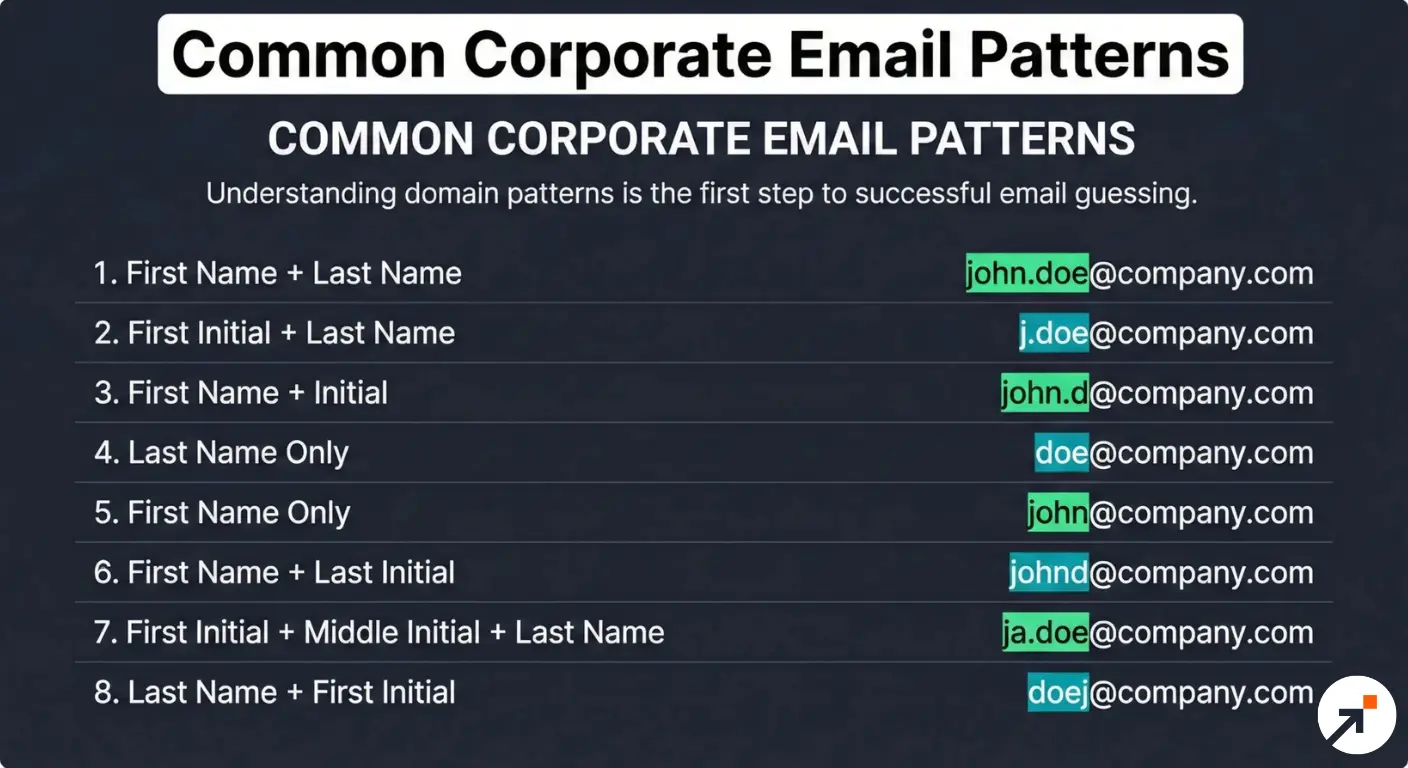
Start by identifying the company’s domain name from their website URL. Then, create a list of potential email structures using the CEO’s name and the company domain. Common formats include:
Start by identifying the company’s domain name from their website URL. Then, create a list of potential email structures using the CEO’s name and the company domain. Common formats include:
- firstname.lastname@company.com
- firstinitial.lastname@company.com
- firstname_lastname@company.com
- firstnamelastname@company.com
- lastname@company.com
- firstname@company.com
For example, if the CEO’s name is Sarah Johnson and the company domain is xyz.com, you might try:
- sarah.johnson@xyz.com
- s.johnson@xyz.com
- sarah_johnson@xyz.com
- sarahjohnson@xyz.com
- johnson@xyz.com
- sarah@xyz.com
To increase your chances of success:
- Look for other employee email addresses on the company website or LinkedIn to identify the company’s email structure.
- Use email verification tools to check which of your guessed addresses are valid.
- Send a test email to the most likely address to confirm deliverability.
Pros:
- Free method: Requires no paid tools or subscriptions.
- High potential accuracy: If you correctly identify the company’s email structure, your guess is likely to be accurate.
- Works for companies of all sizes: Though particularly effective for smaller organizations.
Cons:
- Time-consuming: Testing multiple formats can be lengthy, especially for common names.
- Risk of triggering spam filters: Sending to multiple guessed addresses might be flagged as spam.
- Not scalable: This method becomes impractical when trying to find emails for numerous CEOs.
7. How to Leverage Twitter to Find CEO Email Addresses?
Many CEOs maintain active Twitter profiles, making it a potential channel for direct communication.
Here’s how to approach this method:
- Search for the CEO’s name on Twitter, verifying their account with the company website or LinkedIn profile.
- Follow their account and engage meaningfully with their content over time.
- Look for tweets where they might have shared contact information.
- Craft a concise, professional tweet requesting their email for business purposes.
- If allowed, send a detailed Direct Message explaining your request.
Why this works:
- CEOs often use Twitter for public engagement and may respond personally.
- Your interaction is visible, which could encourage a response.
- You can gain insights into the CEO’s interests, which can help personalize your eventual email.
Pros:
- Direct access: Many CEOs manage their own Twitter accounts.
- Public interaction: Your exchange is visible, potentially encouraging a response.
- Opportunity for relationship building: Engaging with their content can create familiarity.
Cons:
- Public scrutiny: Your approach is visible to everyone, including competitors.
- No guarantee of response: High-profile CEOs may receive numerous mentions and DMs.
8. How to Get CEO Email Contacts Through Direct Company Calls?
Sometimes, the most direct approach is to simply call the company and ask for the CEO’s email address.
Here’s how to do it effectively:
- Find the company’s main phone number on their website.
- Prepare a brief, professional explanation of why you need the CEO’s email.
- Call during business hours and be polite to whoever answers the phone.
- If denied, ask for the email of the CEO’s executive assistant or a relevant department head.
- Be prepared to explain the nature of your business and why you need to contact the CEO directly.
Why this works:
- It’s a direct method that can yield immediate results.
- Even if you don’t get the CEO’s email, you might be directed to a more appropriate contact.
- Human interaction allows for explanation and building rapport.
Pros:
- Immediate results: You might get the email address on the spot.
- Opportunity for alternative contacts: You could be directed to someone who can help.
- Direct human interaction: Allows for explanation and clarification.
Cons:
- Time-consuming: You may face long hold times or need to call multiple times.
- Gatekeepers: Receptionists or assistants may block access to CEO contact information.
- Potential for immediate rejection: Your request might be denied without consideration.
9. How Do Professional Affiliations & Organizations Reveal CEO Emails?
CEOs often hold positions in industry associations, non-profits, or sit on boards of other companies. These affiliations can provide additional avenues for contact.
Here’s how to use this method:
- Research the CEO’s background on the company website, LinkedIn, and other professional platforms.
- Look for mentions of board memberships, advisory roles, or frequent speaking engagements.
- Check industry associations and non-profits in the company’s sector.
- Visit the websites of affiliated organizations for contact information or member directories.
- Reach out to these organizations, explaining your need to contact the CEO.
Why this works:
- Affiliated organizations may have different policies about sharing contact information.
- You might find alternative email addresses used by the CEO for these roles.
- It provides multiple potential contact points and networking opportunities.
Pros:
- Multiple avenues: Provides several potential contact points.
- Valuable context: Affiliations offer insights into the CEO’s interests and priorities.
- Networking opportunities: You might find mutual connections through these organizations.
Cons:
- Time-intensive research: Requires thorough investigation of the CEO’s background.
- Potentially outdated information: CEO’s affiliations may not be current.
- Indirect approach: Contacting through affiliations may be seen as roundabout.
How to Find CEOs of Private vs. Public Companies
The strategy for finding leadership depends entirely on how the company is structured.
- Public Companies: These are the easiest to track. By law, public companies must disclose leadership in SEC filings. You can search the SEC EDGAR database for “Proxy Statements” or “Form 10-K” to find the current CEO, CFO, and CIO.
- Private Companies: These do not have public filing requirements. To find the owner or CEO of a private company, focus on Crunchbase (for startups), Inc. 5000 lists, or local business registries. Since this data is often gated, a verified B2B intelligence platform is often the only way to get a direct email for private owners.
Many companies send out newsletters or regular communications, sometimes directly from the CEO.
Here’s how to leverage this method:
- Visit the company’s website and look for newsletter sign-up options.
- Subscribe using a professional email address.
- Pay attention to sender email addresses, especially for executive communications.
- Look for “From the CEO” sections or direct messages from executives.
- Analyze email headers for additional contact information.
Why this works:
- Some newsletters come directly from the CEO’s email address.
- You become a legitimate recipient of company communications.
- You gain insights into company priorities and the CEO’s focus areas.
Pros:
- Insider information: Gain insights into company priorities and CEO’s focus areas.
- Legitimate recipient: You’re on the company’s approved mailing list.
- Potential direct communication: Some newsletters come directly from the CEO.
Cons:
- Time delay: It may take weeks or months to receive useful information.
- No guarantee: Many newsletters use no-reply email addresses.
- Privacy concerns: Your email address is now in the company’s database.
11. How to Use Website Live Chat to Get CEO Email Information?
Many company websites now feature live chat functions for customer support or sales inquiries.
Here’s how to use this method:
- Visit the company website during business hours.
- Initiate a live chat session.
- Introduce yourself professionally and explain your need for the CEO’s email.
- If denied, ask for alternative contact methods or the appropriate department.
- Request a transcript of the conversation for your records.
Why this works:
- Chat agents may have access to contact information not publicly available.
- You can get real-time responses to your queries.
- Some chat systems might connect you directly to relevant departments.
Pros:
- Immediate response: You can get real-time answers.
- Potential for direct routing: Chat agents might connect you to the right department.
- Record of conversation: You can reference the chat in follow-up communications.
Cons:
- Limited authority: Chat agents may not have access to executive contact information.
- Scripted responses: You might receive standard replies rather than helpful information.
- Business hours limitations: Live chat may not be available 24/7.
12. How to Use Chrome Extensions for Efficient CEO Email Discovery?
Several Chrome extensions are designed to find email addresses associated with websites or LinkedIn profiles.
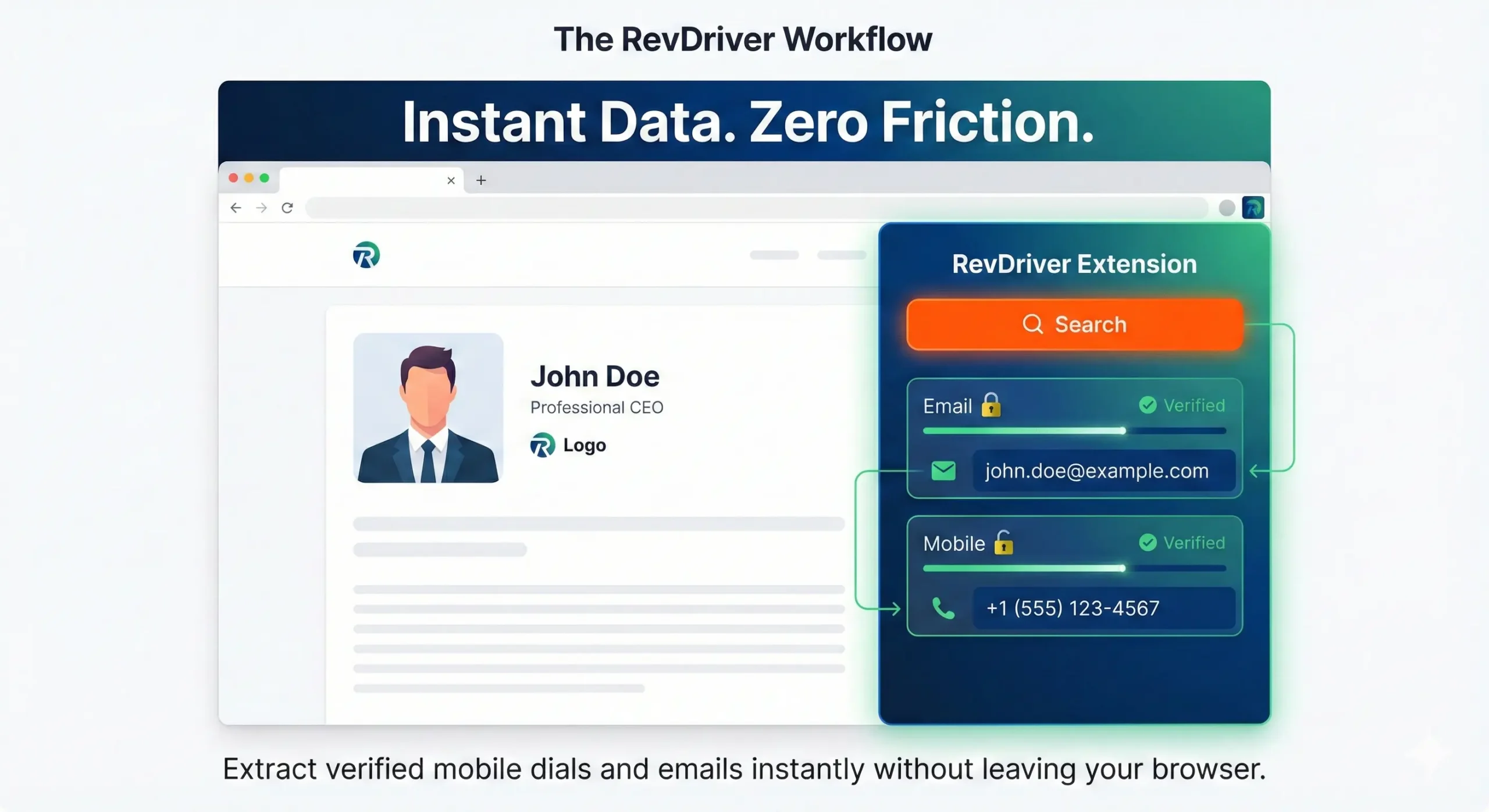
Here’s how to use them effectively:
- Research and install reputable email-finding extensions (e.g., Revdriver, Hunter.io, Snovio).
- Visit the company website or the CEO’s LinkedIn profile.
- Use the extension to search for associated email addresses.
- Cross-reference findings across multiple extensions for accuracy.
- Verify found emails using email validation tools.
Why this works:
- These tools often have large databases of email addresses.
- They can quickly scan websites and social profiles for contact information.
- Some extensions cross-reference multiple data sources for accuracy.
Pros:
- Time-efficient: Quickly find email addresses while browsing.
- Integration: Works seamlessly with your regular workflow.
- Multiple data sources: Many extensions cross-reference various databases.
Cons:
- Accuracy concerns: Data may not always be up-to-date or verified.
- Limited free options: Most robust extensions require paid subscriptions.
- Privacy issues: Some extensions may collect and share user data.
13. Invest in Verified CEO Email Leads from B2B Data Providers?
If other methods fail, you can consider purchasing CEO contact information from B2B data providers like SalesIntel.
Here’s how to approach this method:
- Research reputable B2B data providers with good reviews and high accuracy rates.
- Request sample data to verify quality before purchasing.
- Ensure the provider complies with data protection regulations (GDPR, CCPA, etc.).
- Check the recency of the data and the provider’s update frequency.
- Verify a sample of the emails before using the entire list for outreach.
Why this works:
- B2B data providers specialize in gathering and verifying business contact information.
- You can often get additional data points beyond just email addresses.
- It’s a time-efficient way to acquire multiple CEO contacts at once.
Pros:
- Time-saving: Quickly acquire a large number of contacts.
- Comprehensive data: Often includes additional information beyond email addresses.
- Targeted lists: Can often be filtered by industry, company size, etc.
Cons:
- Cost: Quality lead lists can be expensive.
- Data decay: Contact information can quickly become outdated.
- Quality concerns: Some lists may contain inaccurate or outdated information.
Remember, regardless of the method you choose, always use the information ethically and in compliance with relevant data protection laws and regulations.
How Can SalesIntel Help You Find CEO Emails and Phone Numbers?
Direct access to key B2B decision-makers, especially CEOs, is crucial for successful outreach and collaboration. SalesIntel offers a powerful solution to simplify this process by providing detailed information about companies and their executives. In this guide, we will explore how you can leverage SalesIntel’s RevDriver Chrome extension to find CEO emails and phone numbers effortlessly.
Utilizing the RevDriver Chrome Extension:
- To streamline the process of extracting contact details and firmographics, SalesIntel offers the free RevDriver Chrome extension.
- Users can download and install RevDriver to enhance their browsing experience, gaining quick access to valuable information without leaving their browser.
Extracting Contact Details and Firmographics:
- With RevDriver, users can seamlessly extract contact details, such as email addresses and phone numbers, directly from the SalesIntel Open Directory.
- Additionally, RevDriver allows users to gather firmographic data, providing insights into the structure and characteristics of the target companies.
Enhancing Data with SalesIntel:
- For users seeking more detailed information, SalesIntel offers the option to go beyond basic contact details.
- Users can leverage SalesIntel to obtain mobile dials and technographic data, enabling a deeper understanding of a company’s technological infrastructure.
Unlocking Advanced Features with SalesIntel’s RevDriver+:
- SalesIntel takes the capabilities further by providing insights into the buying behavior of decision-makers.
- Users can identify when CEOs and other key decision-makers actively seek services or solutions, enabling timely and strategic engagement.
Enriching Data with SalesIntel RevDriver+:
-
- SalesIntel allows users to enrich their existing data, ensuring that their contact lists are up-to-date and comprehensive.
- This feature helps in maintaining accurate and relevant information for more effective communication and relationship-building.
SalesIntel RevDriver Chrome extension and the advanced features of SalesIntel’s RevDriver+, provides a robust solution for those seeking CEO emails and phone numbers. This comprehensive approach ensures that businesses can find contact details and gather valuable insights to enhance their outreach strategies and stay ahead in a competitive market.
The “Search Operator” Cheat Sheet
Use these exact strings in Google to find hard-to-reach contact info:
- To find a CEO LinkedIn profile: site:linkedin.com/in/ “Company Name” “CEO”
- To find an Executive Email: “*@companydomain.com” “CEO Name” email
- To find Leadership in Press Releases: site:companydomain.com “appointed” OR “named” CEO
- To find Executive Assistants: site:linkedin.com/in/ “Company Name” “Executive Assistant”
FAQs
What should I do once I have the CEO’s contact information?
Craft a concise, value-driven message that clearly communicates why you’re reaching out and what outcome matters to them. Keep the tone respectful and direct. Follow up professionally if you don’t receive a response.
What is the best database for CEO phone numbers?
The best database for CEO phone numbers is one that provides human-verified mobile-dials. While many tools scrape data, SalesIntel offers 95% accurate, human-verified direct dials, which helps sales teams bypass gatekeepers and reach decision-makers directly on their mobile devices.
What are the success rates of these methods for finding a CEO’s contact information?
Success rates vary by company size and industry, but combining LinkedIn research with reputable data providers can yield 70–80% accuracy. Ultimately, results also depend on how well you personalize and execute your outreach. Reliable data is only half the equation.
What are the best practices for personalizing outreach to a CEO?
Research their company’s priorities, recent announcements, and the CEO’s public interviews or initiatives. Reference something specific to show relevance. Keep your message brief, value-focused, and centered on solving a problem they genuinely care about.
Is it legal and ethical to find and use a CEO’s contact information?
Yes, when used for legitimate B2B communication and in compliance with GDPR, CAN-SPAM, and opt-out rules. Outreach must remain respectful, relevant, and free from personal or intrusive motives. Always honor opt-out or unsubscribe requests immediately.
How can I find a CEO’s email address for free?
You can find a CEO’s email for free by using Google search operators (e.g., site:company.com “CEO” email), checking official press releases, or using the “freemium” version of B2B data extensions like RevDriver. These methods provide a cost-effective way to help you start your outreach without an initial investment.
Is it possible to find a CEO’s email and phone number?
Yes, it is possible, though accuracy varies widely by source. Public information can help, but B2B intelligence platforms often provide the most reliable, verified contact data. These tools are designed specifically to surface executive-level details.
How do I find a CEO’s LinkedIn profile by their company domain?
The fastest way is to visit the company’s official LinkedIn page and use the “People” filter. Type “CEO” in the title search bar. This will filter the thousands of employees down to the specific leadership profiles associated with that domain.
How can I find the LinkedIn profile of a senior leader using a company domain?
If you only have the website (e.g., salesintel.io), go to Google and search site:linkedin.com/in/ “salesintel.io”. This will return every indexed LinkedIn profile associated with that domain. You can then add keywords like “VP,” “Director,” or “Management” to narrow down the senior leadership team.
How can I find a CEO’s phone number?
The most reliable method is using a B2B data provider with human-verified direct dials. Public sources like press releases or business listings can work occasionally, but results are inconsistent. Verified databases save time and reduce failed outreach attempts.
How to bypass gatekeepers when trying to contact a CEO?
You can try calling outside standard business hours or building rapport with the executive assistant instead of bypassing them. The easiest path is using a verified direct-dial number. It reduces gatekeeper friction and increases your chance of a direct conversation.
What are the most effective methods for finding a CEO’s email address?
Use company domain patterns, LinkedIn insights, and specialized email-finding tools. B2B data providers often deliver the highest accuracy by validating emails through multiple sources. Combining methods increases accuracy and deliverability.
Are there any tools that can help me find CEO contact information?
Yes, tools like SalesIntel provide verified CEO emails and direct-dial phone numbers. Others like Hunter.io and LinkedIn Sales Navigator can support initial research. For accuracy and reliability, verified B2B data platforms offer the strongest results.