ICP Analysis & Lookalike Modeling
 Buying Signals & Intent
 AI Automation and Data
 SalesIntel Platform
 Marketing
 Sales
Sales Revenue Operations
 Advertising
 Resources
 Events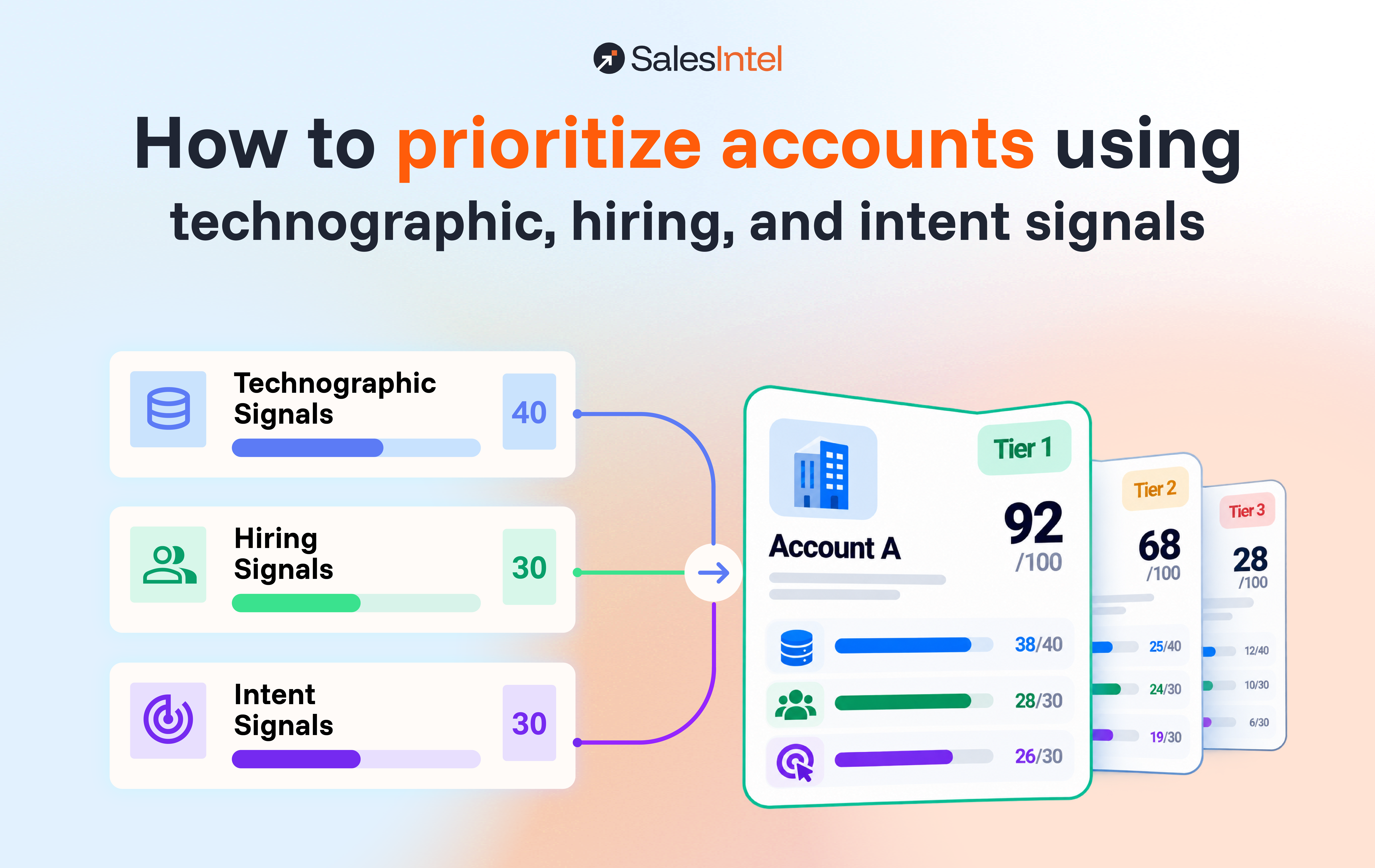
A quick AI-generated overview extracted directly from the content of this page.
To prioritize accounts with technographic data, gate every account on fit first, then score what it runs, who it’s hiring, and what it’s researching, and let the hiring and intent points expire. Ranking by company size alone fails because most accounts aren’t buying at any given moment: up to 95% of business buyers are out of the market for a given product at any one time, per Professor John Dawes’s research for the LinkedIn B2B Institute, as reported by Marketing Week.
Prioritize target accounts with a three-layer model. First, a pass/fail fit gate: the account must match your firmographic ICP and run any technology your product requires. Second, a 100-point score (recommended starting weights, tuned against your own wins): up to 40 points for technographic readiness (competitor or complementary tools installed), up to 30 for hiring signals (job posts naming relevant tools, new leaders in your buyer’s function), and up to 30 for intent (category research and first-party visits). Third, decay: hiring points expire after 90 days and intent points after 30. Tier accounts at 70+ (Tier 1), 45 to 69 (Tier 2), and under 45 (Tier 3), and re-score weekly.
Why account prioritization beats a bigger list
Account prioritization matters because sales time is scarce and most accounts aren’t in a buying window. Sales reps spend only 28% of their time selling, per Salesforce’s State of Sales report, so every hour spent on a poor-fit or out-of-market account comes straight out of that 28%.
Timing makes it worse. B2B buyers are nearly 70% of the way through their purchasing process before they engage a seller, and 81% already have a preferred vendor at first contact, per 6sense’s 2024 Buyer Experience Report. By the time a buyer raises a hand, the shortlist is mostly written.
Your real job is spotting the few accounts about to buy, early enough to make that shortlist. Technographic, hiring, and intent signals are the three best early warnings you have, and weighting them correctly matters more than having them. In the worked example below, the account with the hottest intent score ranks last.
Step 1: Set a fit gate before you score anything
Score nothing until an account passes a fit gate: a pass/fail filter that combines firmographic criteria (industry, headcount, revenue, geography) with technographic prerequisites, meaning any technology your product needs to work. No fit, no points.
Write the gate as a short list of hard rules. For a Salesforce-native sales tool, it might read:
- B2B company, 100 to 5,000 employees
- Headquartered in North America or the UK
- Runs Salesforce Sales Cloud
Accounts that fail any rule get no score at all. That’s deliberate. If an unfit account could still earn points, a loud enough intent spike would push it into a rep’s queue, and that’s the most expensive mistake in account-based selling. If you haven’t defined the firmographic side yet, start with your ideal customer profile.
Step 2: Score technographic readiness (40 points)
Give technographic readiness the biggest share of the account score, 40 of 100 points, because an account’s installed tech stack changes slowly and you can verify it. Score these four signals:
| Technographic signal | Points | Why it counts |
|---|---|---|
| Runs a competitor you displace | 20 | A direct replacement opportunity with a known pain to probe |
| Runs a complementary tool you integrate with | 10 | Your product plugs into something they already paid for |
| Key install anniversary within the next 90 days | 5 | A contract or review conversation is likely approaching |
| Estimated IT spend in the top quartile for its size | 5 | Budget exists for new tools |
These weights are our recommended starting points, not industry constants. Tune them against your own closed-won data (Step 7).
The install anniversary is the signal most teams skip, and it’s the cheapest timing signal you’ll ever get. It only works if your technographic data includes install or adoption dates, not a bare yes/no flag.
Step 3: Score hiring signals (30 points)
Hiring signals show you where a company is putting money and attention right now, so they bridge technographic fit (what an account runs) and intent (what it’s researching). Job postings also expose tools no website scan can see. Score these three:
| Hiring signal | Points | Why it counts |
|---|---|---|
| Open role that names a tool you replace or integrate with (add 5 more for 3+ such roles) | 10 to 15 | Confirms the install, and multiple roles signal deep adoption |
| New leader hired in your buyer’s function within 90 days | 10 | A new leader often reviews the stack they inherit |
| Hiring surge in the team that uses your product (for example, 3+ SDR roles for a sales tool) | 5 | More users means more seats and more pain |
Cap the hiring layer at 30 points. As with Step 2, treat these weights as starting points to tune. A posting for “Salesforce Administrator, 3+ years with CPQ” tells you more about an account’s stack than any crawler, which is why job data belongs in the score, not buried in a rep’s research tab.
To avoid double-counting, let a job posting confirm a technographic install without scoring it twice. If the competitor install already earned 20 points in Step 2, the posting that names it adds hiring points for adoption depth only.
Step 4: Score intent signals (30 points)
Cap intent signals at 30 points, because research activity on your category or competitors is the noisiest of the three scoring layers. Third-party intent had a median precision of 0.51 across 47 deployments in The Starr Conspiracy’s 2024 ABM Operations Audit, so it should break ties among fit accounts rather than set the ranking.
| Intent signal | Points | Why it counts |
|---|---|---|
| Pricing or demo page visit on your site (first-party) | 15 | Direct, known behavior on your own property |
| Third-party research surge on your category | 10 | Broad interest in the problem you solve |
| Third-party research surge on a competitor’s name | 5 | Possible evaluation, possibly a current customer doing homework |
First-party behavior gets the most points in this layer because you know exactly what was viewed. Like every weight in this model, these are starting points, not constants. A third-party surge plus a pricing-page visit is a signal. A surge alone is a maybe.
Step 5: Decay hiring and intent points over time
A hiring or intent signal from six weeks ago is cold, so decay those points as they age and let the account score reflect this week. Technographic points don’t decay; they stay until a data refresh shows the install changed.
Our recommended starting windows:
- Intent points hold full value for 14 days, drop to half from day 15 to 30, and hit zero after that.
- Hiring points hold full value for 60 days, drop to half from day 61 to 90, and hit zero after that.
- Technographic points never decay on a timer; re-verify them on every data refresh and drop them the day an install disappears.
Intent fades fastest because research bursts are short. Hiring lasts longer, since a new leader or team takes months to settle in and buy. Different clocks.
Step 6: Tier accounts and route them
Account tiering turns the score into your routing decision: who works the account, and how. Give reps and marketing the same three tiers and fixed thresholds, so nobody argues about ownership. These thresholds are starting points too; Step 7 is where you move them.
| Tier | Score | Who owns it | Motion |
|---|---|---|---|
| Tier 1 | 70 to 100 | Named rep | Personalized outreach this week, multi-threaded across the buying committee |
| Tier 2 | 45 to 69 | Rep plus marketing | Signal-triggered sequences and targeted ads |
| Tier 3 | Under 45 | Marketing | Nurture and brand programs until the score rises |
Tier 3 isn’t a graveyard. Given the 95:5 rule (up to 95% of business buyers out of market at any one time), most of your fit accounts will sit there at any given time, and they’re next quarter’s Tier 1.
A worked example: three accounts, one ranking
Run three accounts through this technographic, hiring, and intent scoring model and the ranking rarely matches what a size-based list or an intent dashboard would say. All three accounts below passed the fit gate (the firmographic and required-technology screen from Step 1).
| Signal | Account A | Account B | Account C |
|---|---|---|---|
| Runs a competitor (20) | 20 | 0 | 20 |
| Runs a complementary tool (10) | 10 | 10 | 10 |
| Install anniversary within 90 days (5) | 5 | 0 | 5 |
| Job posts naming a relevant tool (10 to 15) | 0 | 0 | 15 (3 roles) |
| New leader in buyer’s function (10) | 0 | 0 | 10 |
| Pricing or demo page visit (15) | 0 | 15 | 15 |
| Category research surge (10) | 10 (3 days old) | 10 | 0 |
| Competitor-name surge (5) | 0 | 5 | 5 |
| Total | 45 (Tier 2) | 40 (Tier 3) | 80 (Tier 1) |
Account B has the hottest intent profile on the list: a demo-page visit, a category surge, and competitor research all at once. It still ranks last, because it runs nothing you replace and isn’t hiring for the problem you solve. Account C combines a competitor install, three job posts naming that tool, a new leader, and a pricing-page visit, so it goes to a named rep today.
That’s the model working. The intent dashboard would have sent your best rep to Account B first.
What technographic fields belong in your CRM
Put a technographic field in your CRM only if it feeds the score or changes what a rep says, and store it on the account record with a last-verified date. Everything else belongs in a data warehouse. Clutter is how reps learn to ignore fields.
Add these fields to the account object in Salesforce or HubSpot:
- Competitor tools installed (multi-select picklist)
- Complementary tools installed (multi-select picklist)
- Install date of each key tool
- Estimated IT spend band
- Technographic last-verified date
- Readiness score, hiring score, intent score (three number fields, kept separate)
- Total score and tier
- Date of the most recent hiring signal and intent signal (drives decay)
Keep the three layer scores separate. When a rep asks “why is this Tier 1?”, the answer should take five seconds to read.
Step 7: Re-score weekly and recalibrate against closed-won
Re-score every account weekly so decay takes effect, and recalibrate the scoring weights every quarter by checking whether your higher tiers win more often.
Each quarter, pull every opportunity created in the last two quarters and check three things:
- Check that Tier 1 accounts convert to opportunities at a higher rate than Tier 2 and Tier 3. If they don’t, the weights are wrong.
- Find the signal that shows up most often in closed-won deals and raise its points.
- Find the signal that fires often but rarely leads to a meeting, and lower its points or cut it.
Stay with a rules-based model like this one until your closed-won history is large enough for a machine-learning model to find patterns a rep can’t. Until then, keep the points. Reps can read them in five seconds, and a score they can read is a score they’ll use.
How SalesIntel supports technographic account prioritization
SalesIntel, an end-to-end pipeline generation and activation platform, supplies all three inputs this scoring model needs, technographic, hiring, and intent, through its ICP Intelligence capability (which scores fit across dimensions including technology) and its Signal Intelligence capability (which tracks hiring surges, new tech adoption, and intent).
For the readiness layer, SalesIntel tracks 42,000+ technologies across 19 categories and 172 subcategories, including behind-the-firewall systems and the date each was adopted. Install dates power the anniversary signal in Step 2, and SalesIntel’s IT spend models estimate each company’s technology budget for the spend signal.
For the hiring layer, SalesIntel parses 2 billion+ resumes and job descriptions, which is how job-post evidence of a tool reaches the account record. For the intent layer, SalesIntel tracks 60,000+ intent topics on the same account record. See how that coverage compares on the technographic data comparison page, and for the broader approach behind this model, read the guide to signal-based selling.
Frequently asked questions
Should technographic fit be a hard filter or a scoring input?
Technographic fit works best as both a hard filter and a scoring input. Use any technology your product requires as a pass/fail gate, then score the rest of the stack (competitor and complementary tools) as readiness points. Gating first keeps intent spikes on unfit accounts from reaching reps.
How long is a buying signal good for?
Buying signals expire at different speeds. As a starting rule, treat intent signals as fresh for 14 days and expired after 30, and hiring signals as fresh for 60 days and expired after 90. Technographic installs stay valid until a data refresh shows they changed.
Do job postings reveal what tools a company uses?
Job postings often reveal a company’s tools, because roles list the systems a hire will run, such as “3+ years administering Workday.” Postings are especially useful for back-office systems that website scans can’t detect.
How do you combine tech stack and hiring signals without double-counting?
Combine tech stack and hiring signals by letting a job posting confirm an install without scoring the install twice. Score the install once in the technographic layer, and give the hiring layer points only for what the posting adds, such as adoption depth across several roles.
When should you switch from a rules-based score to machine learning?
Switch from a rules-based account score to machine learning only when your closed-won history is large enough for a model to find patterns that a rules-based score misses. Until then, a transparent points model is easier to audit, explain to reps, and fix when it’s wrong.