ICP Analysis & Lookalike Modeling
 Buying Signals & Intent
 AI Automation and Data

 SalesIntel Platform
 Marketing
 Sales
 Revenue Operations
 Advertising
 Resources
 Events
Run six steps in a fixed order: detect the signal, confirm the account fits your ICP, find the buying contact, enrich what is missing, assign one owner, and place the account in the queue that matches its signal strength. The order matters because each step removes work from the next one. An account that fails the ICP check never reaches enrichment, and an account without an owner never reaches a queue.
In SalesIntel, steps one through four run inside GTMCanvas, SalesIntel’s no-code workflow builder: a signal trigger, a saved search qualifier, buying committee contacts, and an export to your CRM. Owner assignment and queue placement happen in your CRM after the export, using the signal context the workflow writes to the record. The rest of this post follows one example from first signal to first call, then covers the four things that can break most handoffs: failed lookups, duplicate records, stale signals, and ownership conflicts.
Who this workflow is for
This is written for an SDR manager or RevOps operator who needs a repeatable handoff, not a one-off list pull. If your reps currently find out about a funding round from a Slack message or a spreadsheet that gets updated on Fridays, you have the problem this workflow solves.
This is a workflow topic, not a feature tour. Where SalesIntel does the work, the post names the exact setting. Where your CRM does the work, the post says so and describes the rule you need to build there. Every product-specific step links to a SalesIntel page or support article so you can check it against your own account.
What does the signal-to-queue workflow look like end to end?
The workflow maps to SalesIntel’s three-step model: Identify, Prioritize, and Engage. Steps one and two identify and prioritize accounts. Steps three and four prepare the buying committee. Steps five and six are the engagement handoff.
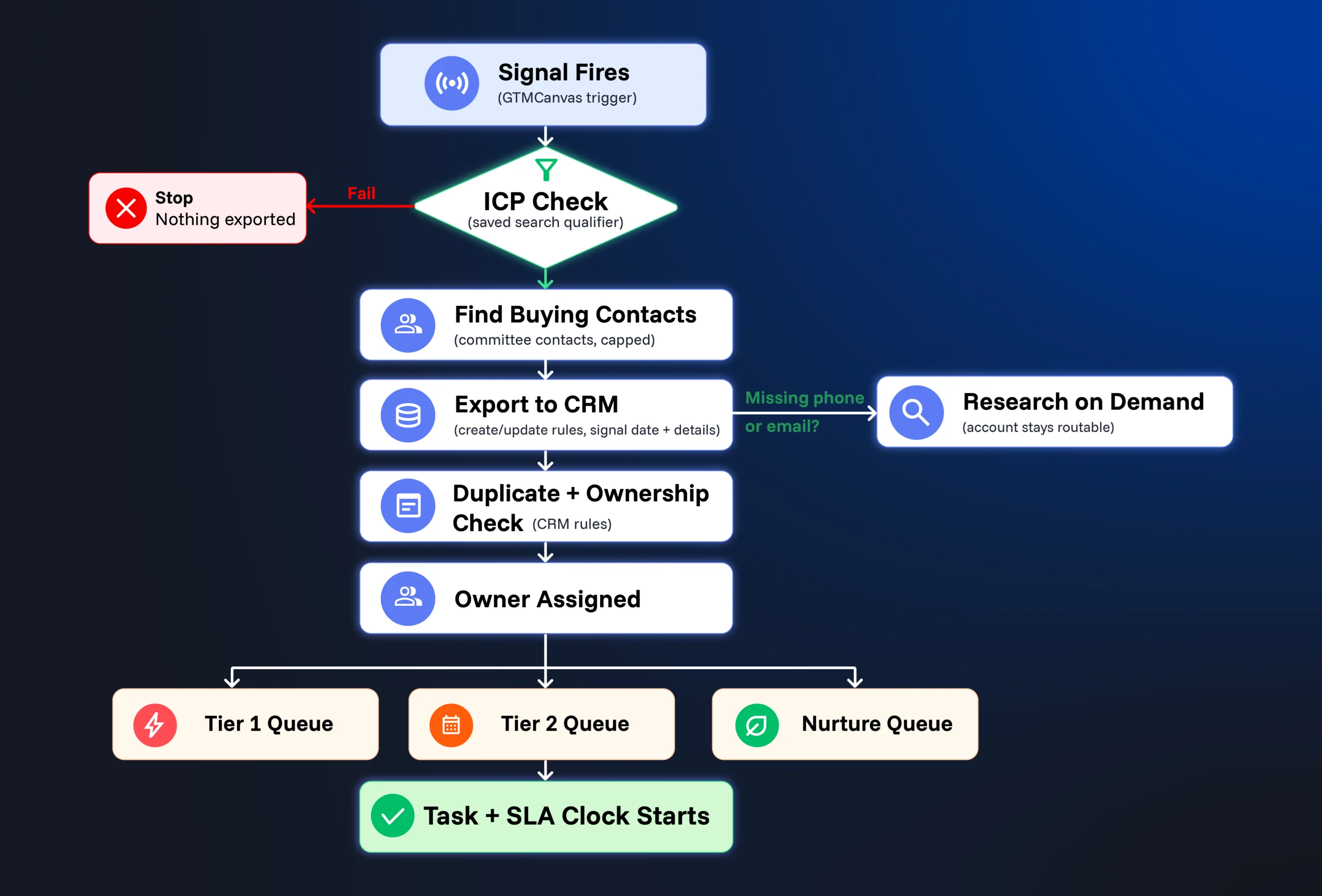
The split between SalesIntel and your CRM is worth stating plainly. According to the GTMCanvas support documentation, workflow actions cover exporting to a CRM, sending an email alert, building an AdsIntel custom audience, and generating AI content. Owner assignment and queue logic are not listed as workflow actions, so plan to build them in your CRM’s assignment rules or flows.
Step 1: How do you detect a buying signal worth routing?
Start with a signal that predicts or confirms a buying cycle, then decide how much it should count on its own. SalesIntel separates predictive signals, which show an account entering conditions that will drive a purchase later, from demand-capture signals, which show active evaluation now. Funding, leadership changes, and hiring surges are predictive. Intent surges, competitor searches, and website visits are demand-capture.
In GTMCanvas you drag a signal onto the canvas to begin. The signals lists PredictiveIntent, Bombora Intent, Website Visitors, Job Change, New in ICP Criteria, New Technology, Growth Signals, and News Mentions as the starting points. Growth Signals cover funding, hiring, IPO, product launches, and similar company events.
For intent signals, set a topic threshold. The qualifiers article explains that you can set a minimum or maximum topic score, or a minimum count of surging topics. If you leave it blank, any account with at least one surging topic passes, which is usually too loose for an SDR queue. SalesIntel also applies an AI suppression model to PredictiveIntent, and according to the buying signals page only signals scoring 60 or higher on its confidence model reach your team.
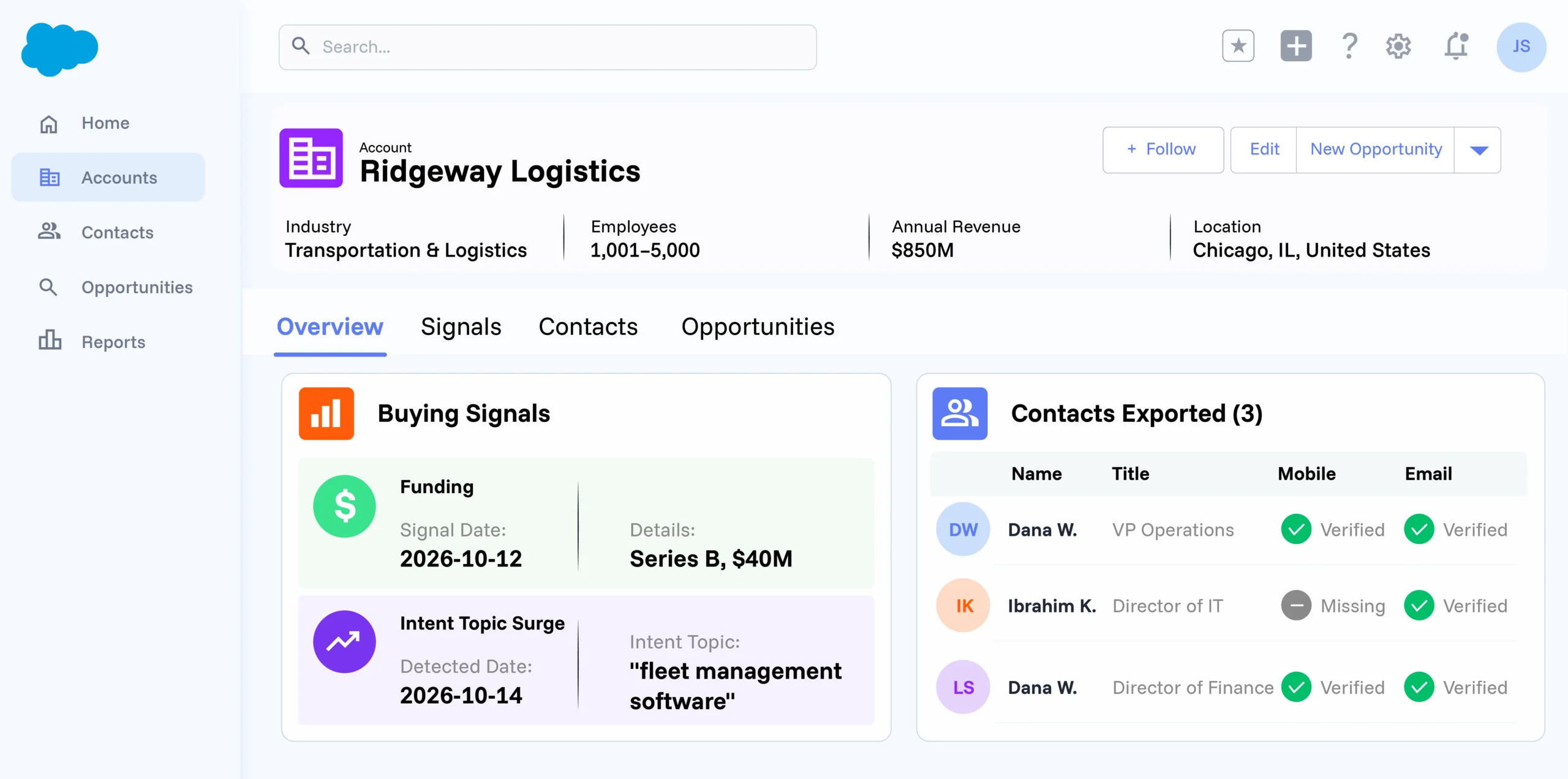
For the example in this post, the trigger is a Series B funding event on a mid-market logistics company. We will call it Ridgeway Logistics. The company, contacts, and numbers below are fictional and are there to show the shape of the inputs and outputs, not customer data.
Sample input: the signal
- Signal type: Growth Signal, Funding
- Company: Ridgeway Logistics (ridgewaylogistics.example)
- Funding Type: Series B
- Amount: $40M
- Signal Date: 2026-10-12
- Second signal: PredictiveIntent topic surge, “fleet management software”
- Second signal detected: 2026-10-14
Two signals inside a week is the pattern to design your top queue around. One is a reason to look, and two from different timelines is a reason to call today.
Step 2: How do you confirm the account fits before an SDR sees it?
Put the ICP check before everything else that costs money or rep time. In GTMCanvas this is the Filter Against a Saved Search qualifier, which narrows company results so your CRM and sequences are not flooded with accounts outside your ICP. It works with PredictiveIntent, Bombora Intent, Website Visitors, New Technology, Growth Signals, and News Mentions.
Build the saved search from your best customers, not from a wish list. SalesIntel’s ICP Intelligence is designed to decode what your best accounts have in common and surface lookalikes, and the buying signals page describes using it to validate signal-firing accounts before committing rep time.
Ridgeway passes a saved search defined as logistics companies with 200 to 1,000 employees in North America. If it had 40 employees or sat in a segment you do not sell to, the workflow would stop here and export nothing. That is the point: the cheapest failed record is the one that never reaches your CRM.
Step 3: How do you find the buying contact?
A signal tells you which account to work, not who to call. In GTMCanvas, the qualifier labeled Add Buying Center Contacts is where you define the roles you want. The support documentation notes you must specify contacts here even if you already used a saved search, because the saved search only narrows companies. In SalesIntel’s current positioning, these are the members of the buying committee, so we will use that term for the rest of this post.
Pick roles by signal. A funding round usually puts operations and finance leaders in the room. A leadership change points at the new executive and their direct reports. For Ridgeway, the workflow looks for a VP of Operations, a Director of IT, and a Director of Finance.
Cap the number of contacts per account. The export step has a Max Number of Contacts setting, and three to five is a workable range for an SDR who needs to thread an account without drowning in records. A longer list feels thorough and mostly produces contacts nobody calls.
Job Change signals work differently. The qualifier requires you to upload a champion list by email address in CSV format, up to 10,000 records per upload, and the workflow tracks those people when they move. This is the right trigger for a warm queue, because the SDR is calling someone who already knows your product.
Step 4: How do you enrich missing contact details?
Enrichment happens in two places: before the export, where SalesIntel supplies the contact record, and after, where a gap needs a human to close it.
SalesIntel’s contact data covers direct dial, mobile, business email, and title, and the buying signals cite 54M+ verified mobile numbers behind its buying committee mapping. The export writes those fields into your CRM using your existing export settings and mappings. According to the support documentation, only a CRM Admin or Operations Admin can enable the export, so line that person up before you build.
The export also carries the signal itself. For growth signals, map a Signal Date field and a Signal Details field. For funding, the details can include funding type, amount, investors, and lead investor. Create a separate pair of fields per signal type if you can, because all details for one type write to a single text field and a shared field gets overwritten.
Sample output: what lands in the CRM
- Account: Ridgeway Logistics
- Signal Date (Funding): 2026-10-12
- Signal Details (Funding): Series B, $40M
- Intent Topic Surge: “fleet management software”, detected 2026-10-14
- Contacts exported (max 3):
Dana W., VP Operations | mobile: verified | email: verified
Ibrahim K., Director of IT | mobile: missing | email: verified
Lena S., Director of Finance| mobile: verified | email: verified
If your team uses the add-on that generates AI content, the workflow can write a suggested email, call script, or LinkedIn request into a CRM field. The support documentation says generated content is cached for 30 days, and that SalesIntel’s prompt is built to avoid naming the signal directly, so the copy will not say it saw the prospect on your website. Train SDRs to follow the same rule on the phone: use the signal to decide when to call and what to ask, not as an opening line.
Step 5: How do you assign an owner?
Ownership is a CRM decision, and it is where most signal programs quietly fail. A signal with no owner is a notification. A signal with two owners is a conflict you will discover when a customer gets two calls.
Set the assignment order before you turn the workflow on. A practical order for named-account and territory teams:
- If the account has an open opportunity, the opportunity owner keeps it, and the SDR gets an informational task only.
- If the account has an assigned owner (an AE or a named-account SDR), the signal routes to that person.
- If the account has no owner, assign by territory first, then round-robin inside the territory.
- If the territory field is blank, send it to a RevOps review queue instead of guessing.
Write the reason for the assignment on the task. “Funding signal 10/12 plus intent surge 10/14, ICP match, mobile verified” takes the SDR five seconds to read and saves a Slack thread.
Step 6: How do you place the prospect in the right SDR call queue?
Queues should reflect how strong the evidence is and how complete the record is, not just which signal fired. Three queues cover most teams.
| Queue | Entry condition | Suggested first-touch window |
|---|---|---|
| Tier 1: Call now | ICP match, two or more signals from different timelines inside 7 days, at least one verified phone | Same business day |
| Tier 2: Work this week | ICP match, one strong signal, or a strong signal with no verified phone yet | Within 2 business days |
| Nurture: Keep warm | ICP match, weak or single predictive signal | Ads or email only, no SDR task |
The suggested windows are a starting point, not a SalesIntel standard. Tune them against your own connect and meeting rates after a month of data.
Ridgeway lands in Tier 1: ICP match, funding on 10/12, intent surge on 10/14, and a verified mobile for the primary contact. The CRM creates a task for the assigned SDR with a same-day due date and the signal context in the description.
Sample output: the routing decision
- Owner: Marcus T. (SDR, Mid-Market East)
- Queue: Tier 1, Call now
- Task due: 2026-10-14, end of day
- Reason: Funding (10/12) + intent surge (10/14), ICP match, VP Operations mobile verified
- Backup contact: Lena S., Director of Finance (mobile verified)
What happens when a contact lookup fails?
A failed lookup is when a buying committee role has no verified phone or email at export time. It will happen often enough that you need a rule for it, because the alternative is an SDR staring at an empty field and moving to the next account.
Build the rule around one principle: a gap in one contact should slow that contact, not the account. In the example, Ibrahim K. has no mobile. The workflow still exports him with a verified email, and the SDR calls Dana first.
For gaps that matter, use Research on Demand. According to the Research on Demand page, the team provides human-verified contact information on request for records that cannot be confirmed, and Express Research on Demand verifies email addresses quickly while other fields like mobile or direct phone are still pending. Set a rule such as: if the primary contact has no verified phone, create a research request and route the account to Tier 2 instead of Tier 1 until the data returns.
Also define a fallback persona. If the VP of Operations cannot be found at all, the next role in your committee list becomes primary, and the task says so.
How do you handle duplicate records?
Duplicates come from the export step meeting a CRM that already knows the account. GTMCanvas gives you four settings for this, covered in the support documentation under Handling Existing Records: Create New Companies, Update Existing Companies, Update Existing Contacts, and Max Number of Contacts. The update options are not available for the Job Change signal.
Choose the settings by play, not once for the whole account. For a named-account play, turn off Create New Companies so a signal on an account you do not track cannot add a fresh record. For a net-new play, leave it on but run a duplicate check in your CRM that matches on domain before the owner is assigned.
The support documentation does not describe how SalesIntel matches an incoming company to an existing record, so test it before you trust it. Export five accounts you know exist in your CRM under slightly different names, such as “Ridgeway Logistics Inc.” and “Ridgeway Logistics LLC”, and confirm whether each updates the existing record or creates a new one. Do this in a sandbox if you have one.
Two rules keep duplicates from reaching reps. First, no task is created until the duplicate check passes. Second, if a contact already sits in an active sequence, the workflow adds a note to the record and does not enroll the contact a second time.
What do you do with stale signals?
A stale signal is one that was true when it fired and has stopped being a reason to call. The signal hasn’t changed, but your window to use it has closed.
Start with how fast the data arrives. According to the FAQ on the buying signals page, freshness varies by type: PredictiveIntent refreshes within a 7-day window, Bombora intent refreshes weekly, new leadership signals track VP-level and above hires within 90 days, and most signals surface within a few days of the triggering event. That means a signal in your CRM is already a few days old on arrival.
That is why the Signal Date field matters. The support documentation recommends a date field for website visitor, new technology, and growth signal exports, and it is the field your queue logic should read. Use it to set expiry rules, such as:
- Intent surge: drops out of Tier 1 after 14 days with no first touch.
- Funding or leadership change: stays valid for 30 to 45 days, because the buying process it triggers is slower.
- Website visit: valid for a short window, since interest fades fast and the lookback you set controls how long a visit counts.
These windows are suggestions to test, and your sales cycle should set the real numbers. What is not optional is the expiry itself. Without one, the Tier 1 queue fills with accounts that were hot three weeks ago, and reps learn to ignore it.
When a signal expires without a first touch, move the account down a tier and log it. A pile of expired Tier 1 tasks tells you the queue is oversized or the SLA is unrealistic, which is useful to know.
How do you resolve ownership conflicts?
Ownership conflicts show up in four forms, and each needs a written answer.
- The account has an open opportunity. The AE owns it. The SDR gets an informational task with the signal context, and nothing goes into a cold sequence.
- The account was closed-lost recently. Route to the AE who worked it for a defined period, 90 days is a common choice, and let them decide whether the new signal justifies a re-engage.
- Two SDRs have a claim. Territory wins. If territory is unclear, the earliest signal date wins, and the loser gets a read-only note. Settle this with a rule, because a rule is faster than a manager.
- The owner does not act. Put a clock on every task. If the first touch has not happened by the SLA, the task escalates to the SDR manager and then reassigns. This is the rule that keeps the whole system honest, since a queue without a reassignment rule is just a to-do list.
What are the explicit handoff rules?
This table is the version you can paste into your RevOps documentation and adapt. The conditions are written so a CRM admin can build them without interpretation.
| Rule | Condition | Action |
|---|---|---|
| 1. ICP gate | Account fails the saved search | Do not export |
| 2. Duplicate gate | Matching company or contact exists | Update the existing record, never create a second one |
| 3. Open opportunity | Account has an open opportunity | Route to the opportunity owner, informational task only |
| 4. Existing owner | Account has an assigned owner | Route to that owner |
| 5. No owner | No owner on the account | Assign by territory, then round-robin |
| 6. Missing phone | Primary contact has no verified phone | Create a Research on Demand request, place in Tier 2 |
| 7. Tier 1 entry | Two or more signals from different timelines within 7 days, verified phone | Tier 1, same-day task |
| 8. Expiry | Signal date older than the window for its type | Move down one tier and log |
| 9. No action | First touch missed past the SLA | Escalate to the manager, then reassign |
What should you measure after launch?
Measure four numbers by queue and by signal combination: time from signal date to first touch, task acceptance rate, connect rate, and meetings booked per 100 tasks. The point of the combination view is to learn which signal pairs earn a Tier 1 slot and which only look good on a dashboard.
SalesIntel’s RevOps materials describe tracking which signal combinations drive the best pipeline conversion, and the platform pages mention signal-to-revenue attribution.
Want to have a SalesIntel walkthrough?
Frequently Asked Questions
Does SalesIntel assign owners and build the SDR queue for me?
SalesIntel does not directly assign owners or build SDR queues through its documented GTMCanvas workflow actions. GTMCanvas, SalesIntel’s no-code workflow builder, exports qualified accounts and contacts to your CRM, sends email alerts, builds AdsIntel audiences, and can generate AI content. Owner assignment and queue placement depend on your CRM’s rules, which this post explains how to configure.
Which CRMs can GTMCanvas export to?
SalesIntel’s GTMCanvas support documentation lists Salesforce, HubSpot, Zoho, and Microsoft Dynamics as supported CRM export destinations. SalesIntel’s buying signals page also describes native sync with Salesforce and HubSpot, along with webhooks and an API for custom routing workflows.
How fresh are SalesIntel’s buying signals?
SalesIntel refreshes buying signals on different schedules depending on the signal type. PredictiveIntent refreshes within seven days, Bombora refreshes weekly, and most signals appear within a few days of the triggering event. SalesIntel users should configure signal expiry rules that account for the possibility that a signal is already a few days old when it arrives.
What if a SalesIntel contact has no phone number?
SalesIntel users can export the contact with the verified information available, create a Research on Demand request to obtain the missing phone number, and keep the account routable through another buying committee member. Avoid holding up the entire account because one contact is missing a phone number.
Do I need engineering help to build this?
The signal, qualifier, and export steps are configured in GTMCanvas, which SalesIntel describes as a no-code builder. The CRM side, meaning assignment rules and queue views, usually needs a CRM admin, and the export itself requires a CRM Admin or Operations Admin to enable.