ICP Analysis & Lookalike Modeling
 Buying Signals & Intent
 AI Automation and Data
 SalesIntel Platform
 Marketing
 Sales
Sales Revenue Operations
 Advertising
 Resources
 Events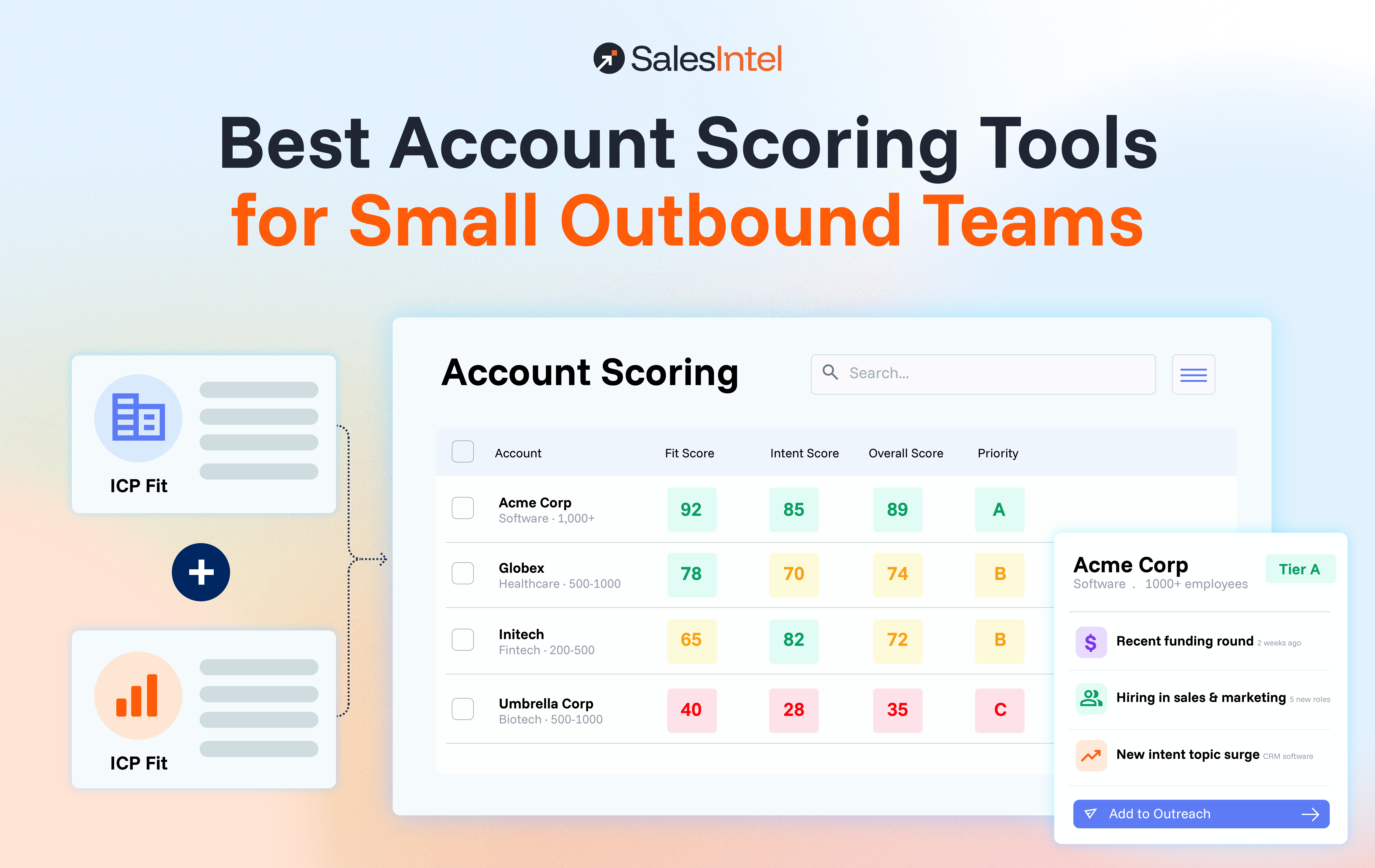
Most small outbound teams should start with a score inside their CRM and buy dedicated software only when that score stops changing what reps do. A CRM score is enough when your ideal customer profile (ICP) is stable, your account records are complete, and timing does not decide who you win. Dedicated software earns its cost when you need fit and buying signals from outside your CRM, a score that shows its reasoning, and a way to turn each score into a next step for a rep.
For teams of roughly three to fifteen reps, the realistic short list is HubSpot or Salesforce native scoring (lowest cost to start), Apollo (scoring bundled with data and sequencing), Clay (flexible, but you build it), MadKudu (predictive, strongest for product-led SaaS), and SalesIntel (fit and signal scoring tied to rep actions). The sections below compare them on inputs, setup effort, explainability, CRM support, pricing, and action-readiness, which are the criteria that matter at small-team scale.
This guide is about picking a tool under small-team constraints. If you want the underlying evaluation factors first, read our guide to account scoring software factors that predict fit, then come back here to build your shortlist.
Do small outbound teams need account scoring software?
Not always, and the answer depends on three constraints small teams share: limited rep hours, thin RevOps support, and a target list small enough to review by hand. When a team works 200 accounts and every rep knows most of them, a well-built CRM view will beat a model nobody trusts.
The case for software gets stronger when timing starts to matter. A small team that waits for a form fill is usually arriving after the shortlist is set, so the question becomes how to spot in-market accounts earlier without adding headcount.
Three signs it is time to look beyond a CRM score:
- Reps keep a private list of “real” accounts because the CRM score does not match what they see in the field.
- Your account records have gaps, such as missing employee counts, industries, or technology data, so a rules-based score runs on guesses.
- You win or lose on timing: a funding round, a hiring push, a new executive, or a tool change.
When is a simple CRM score sufficient?
A simple CRM score is sufficient when four conditions hold at the same time.
- Your ICP is stable. You sell into one or two segments, and you can describe the best-fit account in five or six fields.
- Your data is complete. The fields your score reads are filled in for most accounts, and someone refreshes them on a schedule.
- Your list is reviewable. A rep can scan their full account list in one working session and still remember why each account is on it.
- Timing is not your edge. Your sales cycle is long, and buyers are not changing vendors in response to events you could detect.
HubSpot is a good example of what a CRM can do. Its lead scoring tool lets you build fit, engagement, or combined scores from property values and event activity, such as a company fit score built on region, company size, and industry. The tool is available in Professional and Enterprise tiers of Marketing Hub and Sales Hub, and the types and number of scores you can create depend on your subscription. If your team already pays for one of those tiers, a rules-based fit score costs a few hours and no new software.
The limit is the input. A CRM score only sees what is in the CRM, so it cannot tell you that an account just posted three roles in your buyer’s department. When that kind of timing decides your pipeline, dedicated software starts to pay for itself.
What should a small team compare before buying?
Seven criteria separate tools that help a five-person team from tools that need a five-person RevOps function.
Required inputs. Every scoring tool needs an ICP definition and a list of accounts to score. Predictive tools also need your closed-won and closed-lost history, so a team with only a few dozen deals gives a model very little to learn from. Tools that bring their own firmographic, technographic, and signal data save you from filling CRM gaps yourself.
Implementation effort. Rules-based scoring in a CRM takes hours to days. Predictive models take longer: MadKudu’s own documentation, as reported in one review, outlines roughly three weeks and about 15 hours of work for a new multi-fit model. Build-it-yourself platforms like Clay shift the effort onto whoever designs the workflow.
Explainability. Reps act on scores they can explain to a prospect or a manager. A score that says 82 with no reasons gets ignored within a month. Prefer tools that show which fit attributes and which signals produced the number.
Fit versus intent scoring. Fit tells you whether an account could ever be a good customer, and intent tells you whether now is the moment. Small teams need both, but fit comes first: a perfect intent signal on a poor-fit account wastes the scarcest resource you have, which is rep time.
CRM support. The score has to land where reps already work. Check whether the tool writes scores back to your CRM as fields, and whether that sync sits on a higher pricing tier than the one you are quoted.
Pricing. Look at the full cost of ownership: seats, credits, add-ons, and the tier that unlocks CRM sync. Published list prices are a starting point, and several tools in this guide are quote-only.
Ability to turn scores into rep actions. A score is only useful if it changes Monday morning. The best tools pair every score with a reason and a suggested next step, so a rep knows whom to call, what to reference, and which accounts to leave alone.
Best account scoring tools for small outbound teams, side by side
Prices below are list prices from public pages and third-party trackers as of October 2026. Confirm current pricing with each vendor before you buy, because several of these plans changed in 2026.
| Tool | Scoring approach | Setup effort | Explainability | CRM support | Pricing to verify |
| SalesIntel | ICP fit score plus signal-ranked account list | Days, fit model built from your best customers | Fit scored across seven dimensions; ask for per-account reasons in a demo | Prioritized accounts flow into your CRM | Quote-based, depends on seats and add-ons |
| HubSpot native scoring | Rules-based fit, engagement, or combined scores | Hours to days, you write the rules | High, you set every criterion | Native, it is the CRM | Included in Professional or Enterprise tiers; Marketing Hub Professional lists from about $800 per month |
| Salesforce native scoring | Einstein models, edition dependent | Days to weeks, needs clean history | Moderate | Native, it is the CRM | Depends on edition and add-ons; confirm with your rep |
| Apollo | Scoring and filters on top of its prospect data | Hours to days | Moderate | HubSpot and Salesforce sync, check your plan | $49, $79, or $119 per user per month billed annually |
| Clay | Scoring you build from enrichment workflows | Days to weeks, you design it | High if you design it well | Salesforce and HubSpot sync on Growth only | Launch $185 per month, Growth $495 per month, unlimited seats |
| MadKudu | Predictive fit and likelihood-to-buy models | Around three weeks per model | High, shows the signals behind each score | Salesforce and HubSpot | Quote-based; third-party estimates start near $1,000 per month |
SalesIntel
SalesIntel is an end-to-end pipeline generation platform for GTM teams, and scoring sits inside a three-step flow: Identify, Prioritize, Engage. ICP Intelligence (ICPIntel) scores every account in your total addressable market against your ideal customer profile, and the fit model is built from your best customers across seven dimensions and more than 60 variables. Signal Intelligence tracks 30+ signal categories across both predictive and demand-capture timelines, so a rep sees which high-fit accounts are moving now.
Buying Committee Activation closes the gap between score and action. SalesIntel maps the buying committee for a scored account, then either triggers personalized sequences or hands reps a prioritized list in your CRM. The honest caveat: pricing is quote-based, and if you work a short, stable list with complete CRM data, a native CRM score may be all you need. SalesIntel fits best when your data has gaps, timing matters, and you want fit, signals, and rep actions from one platform.
HubSpot native scoring
HubSpot is the right first move if you already run your team in it. You define the criteria, so the score is fully explainable, and it lives on the record your reps already open. The caveat is the one covered above: the score is limited to data inside HubSpot, so it is only as good as your property completeness, and it does not detect events outside your own channels.
Salesforce native scoring
Salesforce offers Einstein scoring features, but access depends on your edition and add-on licenses, and the packaging has shifted over the years. Sales Cloud Einstein has historically been sold at additional cost for some features, so ask your account executive exactly what your contract includes before you plan around it. Predictive models also need enough closed-won history to learn from, which is a real constraint for a young team.
Apollo
Apollo is a sensible pick when you want prospect data, sequencing, and basic scoring in one low-cost seat. List prices run $49, $79, and $119 per user per month on annual billing, and the Organization plan has a three-user minimum. For a five-rep team on Professional, that is $4,740 a year at list. The catch is credits: mobile and export credits are metered, so active teams often pay more than the sticker price, and scoring depth is lighter than a dedicated model.
Clay
Clay suits teams with a RevOps person who enjoys building workflows. Launch is $185 per month and Growth is $495 per month, with unlimited seats, so cost does not rise with headcount. Two caveats matter for small teams: CRM sync is reported to be limited to the Growth plan, and credits are metered, so a badly designed table can burn a month of allowance in an afternoon. Clay gives you flexibility, and you provide the design and the maintenance.
MadKudu
MadKudu is the specialist for product-led SaaS. Its models score customer fit and likelihood to buy, and it uses what it calls a glass-box approach that exposes the signals behind each score. Pricing is quote-based, and third-party estimates start around $1,000 per month, which puts it at the upper end of what a small team will budget. If your buyers sign up for a free trial or product and usage is the strongest signal you have, it is built for you. If you run pure outbound against cold accounts, much of its strength goes unused.
Enterprise ABM platforms
6sense and Demandbase are strong platforms with deep account-based programs, and they are built for teams with marketing operations, ad budgets, and dedicated admins. Third-party trackers list entry points in the tens of thousands of dollars a year, usually on annual contracts. For a small outbound team, that is more platform than the problem requires.
Fit scoring or intent scoring: which does a small team need first?
Start with fit. A fit score narrows a market of thousands of accounts to the few hundred that deserve attention, and it does so with stable inputs that change slowly. Once you trust that list, add signals to decide the order in which reps work it.
Intent without fit is where small teams lose the most time. A competitor’s customer researching your category will light up an intent feed, but a rep calling that account may be wasting a week. Fit without intent has the opposite problem: the list is right, but the order is random, and reps call a perfect account six months before it buys.
The practical sequence for a small team looks like this:
- Build or buy a fit score and review the top tier by hand until reps agree with it.
- Add timing signals to rank accounts inside that tier.
- Set a rule for what each combination of fit and signal means, so reps do not have to interpret a number.
What does account scoring output look like?
A useful score output has four parts: a fit score, a signal score, a plain-language reason, and a next step. The example below is illustrative, built with fictional accounts to show the shape of the output rather than real customer data.
Tier rules for this example: Tier A is fit of 75 or higher and signal of 60 or higher. Tier B is fit of 75 or higher with a signal below 60, or fit from 50 to 74 with a signal of 60 or higher. Everything else is Tier C.
| Account | Fit (0 to 100) | Signal (0 to 100) | Tier | Why it scored this way | Rep action this week |
| Northwind Logistics | 92 | 81 | A | Matches ICP on industry, size, and tech stack; hiring two RevOps roles; researching your category | Call the VP of Sales and the RevOps lead today; reference the hiring plan in the first message |
| Pinecrest Software | 95 | 72 | A | Strong ICP match; new sales leader started 30 days ago | Contact the new leader with a message about early priorities; add a second contact from the buying committee |
| Brightline Health | 88 | 34 | B | Strong fit, no meaningful signals in the last 30 days | Add to a monthly touch cadence; review again if a hiring or funding signal appears |
| Cobalt Freight Systems | 61 | 90 | B | Below ideal size, but strong demand-capture signals | Make one qualifying call to confirm headcount before starting a full sequence |
| Delta Ridge Manufacturing | 74 | 15 | C | Near-fit, no activity | Leave in the database; recheck next quarter |
| Harbor and Vale | 38 | 76 | C | Heavy research activity, but poor fit on size and region | Do not work in outbound; route any inbound request to a partner or self-serve path |
Three details make this output work for a small team. Each row explains itself, so reps trust it. The action column replaces interpretation with instruction. And the Tier C rows tell reps what to skip, which is where a small team recovers the most time.
How to choose by team size
Three to five reps, one segment, already on HubSpot or Salesforce. Build a rules-based fit score in the CRM this month and keep a manual watchlist for timing. Revisit the decision in a quarter, and move to dedicated software only if reps stop trusting the score or you cannot keep your data complete.
Five to ten reps, data gaps, no RevOps owner. You need a tool that brings its own data and signals, because nobody has time to repair CRM fields by hand. Compare Apollo for lower cost and lighter scoring against a platform like SalesIntel for deeper fit, signals, and rep actions. Run the same account list through both.
Ten to fifteen reps with a RevOps owner. You can support a more configurable approach. Clay works if your owner wants to build and maintain workflows, and MadKudu works if your motion is product-led and usage data drives timing. If outbound against cold accounts is your main motion, weigh those options against a platform that ships with signals and activation.
How long does implementation take?
Plan on a month for a first working version, regardless of tool. In week one, define the ICP in five or six attributes and pull your last 20 closed-won accounts. In week two, load or connect the data and score your list. In week three, review the top tier with reps and adjust weights where they disagree. In week four, write the rule for each tier and put the score and the reason in the CRM view reps use daily.
Account scoring does not finish after launch. Review conversion by tier every quarter, and retire any attribute that does not separate wins from losses.
Frequently asked questions
What is the best account scoring software for a small sales team?
The best option depends on what you already own and where your data is weakest. If you use HubSpot or Salesforce with clean records, native scoring is the lowest-cost place to start. If your data has gaps or timing drives your wins, a dedicated platform such as SalesIntel, or a predictive specialist such as MadKudu for product-led SaaS, is worth evaluating.
How much does account scoring software cost for a small team?
List prices run from about $49 per user per month for Apollo’s Basic plan to several thousand dollars a month for predictive specialists. Clay starts at $185 per month with unlimited seats, MadKudu estimates begin near $1,000 per month, and platforms like SalesIntel are quote-based. Budget for credits, add-ons, and the tier that unlocks CRM sync, because those often decide the real cost.
Can HubSpot or Salesforce do account scoring?
Yes, both can score accounts, with limits. HubSpot’s lead scoring tool supports company fit scores and engagement scores in Professional and Enterprise tiers. Salesforce scoring depends on edition and add-ons. Both score only the data inside the CRM, so gaps in your records limit the result.
What is the difference between fit scoring and intent scoring?
Fit scoring measures how closely an account matches your ideal customer profile, using firmographic and technographic attributes that change slowly. Intent scoring measures how actively an account is researching or showing buying behavior right now. Small teams usually need fit first and signals second.
When should a small team skip account scoring software?
Skip it when your ICP is stable, your CRM data is complete, and your reps can review their whole list in a single session. In that case, a native CRM score gives you most of the value for none of the new cost.
Run this test before you buy anything
The fastest way to decide is to test your current score against your own wins. It takes about 30 minutes, and the result tells you whether you need new software or just a better rule.
- Export your last 20 closed-won accounts and the 50 accounts your reps are working right now.
- Check where the wins sit in your current CRM score. As a rule of thumb, if most of your closed-won accounts land in your top tier, your score is doing its job and you should keep it. If wins are scattered across tiers, your score is not separating good accounts from bad ones.
- Write down what the score missed. Look for accounts that won on timing, such as a hiring push or a leadership change, and accounts with gaps in the record. Those two lists tell you whether you need better signals, better data, or both.
- Run the same 50 accounts through two tools and compare their top tiers against what your reps know. Pick the one whose reasons your reps can repeat back to you.
If you want to see how your accounts score on fit and signals side by side with your current CRM score, bring your list of 50 target accounts to a SalesIntel walkthrough and ask to see ICP Intelligence and Signal Intelligence applied to them. You will know within one session whether a dedicated platform changes who your reps call first.