ICP Analysis & Lookalike Modeling
 Buying Signals & Intent
 AI Automation and Data
 SalesIntel Platform
 Marketing
 Sales
 Revenue Operations
 Advertising
 Resources
 Events
A quick AI-generated overview extracted directly from the content of this page.
If nobody on your team owns Clay tables, choose the replacement by the job Clay does for you today. Clay does two jobs. It pulls data from many providers, and it orchestrates, which means it runs the workflow that decides which data to fetch, in what order, and where the result goes.
For orchestration without an engineer, the strongest fits are platforms that ship the workflow with the data: SalesIntel (through GTMCanvas), ZoomInfo’s GTM Studio, and Unify for signal-triggered plays. Apollo and Amplemarket cover prospecting and sequencing with lighter enrichment logic.
For data sources alone, FullEnrich and BetterContact replace Clay’s provider waterfall, and HubSpot’s built-in enrichment fills CRM fields. None of those three runs your workflow for you.
Keep Clay if you have a technical owner and need the widest provider access or custom research that no packaged workflow covers.
Why the missing GTM engineer should shape your shortlist
A GTM engineer builds and maintains the workflows that move data from providers into your CRM and sequencing tools. A typical job listing asks for someone to design Clay workflows, keep tables and automations current, connect Clay to Salesforce or HubSpot, and keep records consistent and deduplicated.
That person is expensive and hard to hire. Bloomberry’s review of about 1,000 GTM engineering listings found an average salary of $127,500, an average experience requirement of 4.11 years, and Clay as the most common tool named.
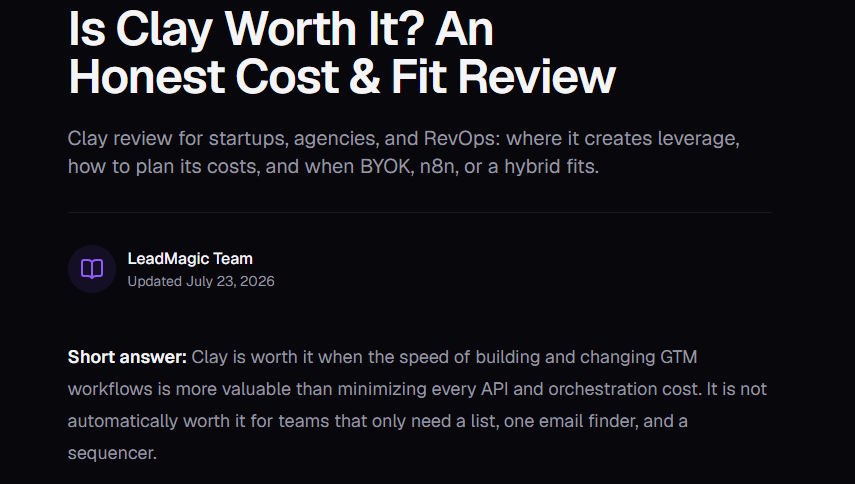
Clay rewards an owner. Leadmagic’s review of Clay notes that a table looks like a spreadsheet, but a production workflow behaves like software. Because adding a column is easy, tables collect duplicate enrichments, outdated fallbacks, and formulas nobody documented.
Mistakes also cost money. Amplemarket’s Clay cost analysis points ouAmplemarket bundlest that every test run spends credits, and a waterfall multiplies spend because each fallback provider is billed on its own.
So treat one question as a selection criterion with the same weight as price: who maintains this workflow in month six? Ask it of every option on your list.
- Who rebuilds the workflow when a data provider changes its output or pricing?
- Who fixes it when someone renames a CRM field?
- Who watches credit spend and catches a runaway table?
- What happens to the workflow when the person who built it leaves?
One fair note on Clay itself. Clay has started moving orchestration out of tables. Its Workflows product puts the logic on a canvas, and Clay says agents can build workflows from plain language through its command-line tool or its Sculptor assistant. Test the current version before you rule it out.
How we compared the options
Every option below gets the same six checks.
- Setup effort: how much a non-technical team must configure before the first record lands in the CRM.
- Maintenance: how much upkeep the workflow needs once it runs.
- Provider access: where the data comes from and how many sources you can reach.
- Workflow flexibility: how far you can bend the logic beyond the vendor’s defaults.
- CRM delivery: how records, owners, and activity reach Salesforce or HubSpot.
- Total cost: subscription, credits, and the labor to keep the workflow running.
Two terms matter throughout. Orchestration is the workflow logic that decides which data to fetch, in what order, and where the result goes. A data source is where the contact or company data comes from. Clay does both jobs. Most alternatives do one of them, or do both at a smaller scale.
The ratings in this guide are editorial assessments based on vendor documentation and the sources linked in each section. Confirm them in a trial with your own ideal customer profile (ICP) and CRM.
Which options replace orchestration and which replace data
This table sorts every option by what it replaces. Read it before you read any vendor’s feature list.
| Option | Replaces Clay’s orchestration? | Replaces Clay’s data sources? | Setup effort | Maintenance load |
|---|---|---|---|---|
| SalesIntel | Yes, for signal-to-pipeline plays (GTMCanvas) | Yes, from its own data foundation | Low to medium | Low |
| Unify | Yes, for signal-triggered outbound plays | Partly, through signals and enrichment | Low to medium | Low to medium |
| Apollo | Partly, through sequences and enrichment rules | Yes, own database plus a 20-provider waterfall | Low | Low |
| Amplemarket | Partly, through outbound sequences and AI agents | Yes, from its own database | Medium | Low to medium |
| FullEnrich or BetterContact | No | Yes, waterfall for emails and mobile numbers | Low | Low |
| HubSpot built-in enrichment | No | Partly, firmographic fields in HubSpot | Low | Low |
| Clay (for reference) | Yes | Yes, 150+ providers | High | Medium to high |
Clay alternatives that replace its orchestration
These options ship a workflow engine with the data. They suit a team that wants the result without owning the build.
SalesIntel: signal-to-pipeline workflows with the data included
SalesIntel is a pipeline generation platform for GTM teams. It combines ICP modeling, buying intent signals, and buying committee activation so AI agents can automate prospecting while your team builds relationships. Built on the foundation of AI automation and human-verified B2B data.
ICP Intelligence models your best customers to identify and prioritize lookalike accounts that fit your ideal customer profile.
Signal Intelligence tracks 30+ signal categories and 60,000+ intent topics to help you understand which accounts are showing buying interest.
Buying Committee Activation identifies key stakeholders within target accounts and helps your team engage the right people with relevant outreach.
Orchestration lives in GTMCanvas, a drag-and-drop builder. SalesIntel helps teams act on buying signals, build buying committees, write personalized outreach, and launch campaigns with no engineering required. SalesIntel also says ICP Intelligence needs a list of your best customer accounts to build its first model.
Data comes from SalesIntel’s own foundation: 235M+ verified B2B contacts, 54M+ verified mobile numbers, and 95% data accuracy (AI+Human-verified). Delivery runs through native Salesforce and HubSpot integrations, connections to Outreach, Salesloft, and Marketo, and an API with webhooks. SalesIntel lists 50+ CRM and MAP integrations in total.
- Fit: Teams that want signals, contacts, and workflows under one contract and one set of ICP definitions, and do not want to maintain provider logic.
- Limit: If your plays depend on chaining many outside providers or running custom web research, Clay’s marketplace gives you more room.
- Cost: SalesIntel offers custom pricing, with unlimited users and export and enrichment credits per user per month. Additional capabilities, including Advanced Intent, AdsIntel, VisitorIntel, FormsIntel, Retargeting Ads, and ICPIntel, are available as add-ons. Contact SalesIntel for pricing details.
ZoomInfo GTM Studio: a play builder on a large database
GTM Studio is ZoomInfo’s codeless play builder. ZoomInfo’s comparison with Clay says workflows are built in natural language, and enrichment draws on ZoomInfo’s own database first, then a waterfall across 25+ additional sources. ZoomInfo’s waterfall enrichment is included for all GTM Studio customers at no extra cost and runs in parallel across vendors instead of one after another.
That design removes much of the provider-ordering work a Clay builder does by hand. The tradeoffs are cost and weight. Pricing is custom, and G2 reviewer summaries describe the platform as complex at first and expensive for small teams.
- Fit: mid-size and larger teams, especially ones already buying ZoomInfo data.
Unify: signals turned into outbound plays
Unify turns signals into outbound plays. Its Plays builder is a canvas where a trigger, such as a visitor reaching your pricing page, flows into prospecting and outreach steps.
Setup effort is low for signal-triggered plays. The limit is scope. Unify runs signal-to-sequence plays, not open-ended research or multi-provider enrichment experiments. ZoomInfo’s review of Unify also flags credit-based pricing that can be hard to predict, so ask for a usage estimate against your own play volume.
Fit: warm outbound teams that want to act on website visits, job changes, and similar signals.
Apollo: database and sequencing, with waterfall enrichment
Apollo combines a contact database with email sequencing. Per Outpace Daily, waterfall enrichment became its default in December 2025, and plans run $49, $79, and $119 per user per month on annual billing, with a three-user minimum on the Organization plan. FullEnrich’s analysis reports that the waterfall queries 20 connected providers after Apollo’s own database and spends up to 9 credits per record: 1 for an email, 8 for a phone number.
Apollo replaces Clay’s data access and part of its workflow, mainly through sequences and enrichment rules. It does not offer Clay-style custom branching. The same Outpace Daily summary notes that teams with higher-volume or higher-precision needs often keep Clay alongside Apollo.
- Fit: teams that mostly need contacts and a sequencer in one tool.
Amplemarket: data, signals, and sequencing under one contract
Amplemarket bundles a contact database, signals, multichannel sequences, and AI agents under its Duo brand. Amplemarket’s own pricing guide says every plan includes bi-directional CRM integration with Salesforce and HubSpot, and that the platform has a learning curve.
Amplemarket publishes a price for one plan, Startup, which Modern Inbound reports at $600 a month for two seats on annual billing. Growth and Elite are quoted on request.
Amplemarket runs outbound plays rather than general enrichment workflows.
- Fit: SDR teams that want data, signals, and sequencing under one contract.
Clay alternatives that replace its data sources but not its orchestration
These tools answer one question: given a name and a company, what is the verified email or mobile number? They do not decide who to contact, when to contact them, or where the record goes.
FullEnrich and BetterContact
Both run waterfall enrichment across multiple providers and charge on success. FullEnrich starts at $29 a month for 500 credits. A verified work email costs one credit, a mobile number costs 10, and a failed lookup costs nothing. In a September 2026 comparison, 1,000 credits cost $49 a month on BetterContact and $55 on FullEnrich.
Pay-on-success pricing helps a team without an engineer, because a misconfigured run costs less. Docket’s Clay pricing research reports that Clay bills Data Credits for enrichment attempts even when no result comes back, so a loose waterfall can spend credits on misses.
BetterContact also offers a native Clay integration, so these tools can sit inside a Clay workflow as well as replace its providers.
- Fit: teams with a target list and a sequencer whose gap is contact coverage.
- Limit: no signals, no routing, and no CRM logic.
HubSpot’s built-in enrichment
For HubSpot users, Breeze Intelligence fills company and contact fields on CRM records. HubSpot’s standard data enrichment does not consume HubSpot Credits on eligible subscriptions. Buyer Intent uses 10 credits per company per month to enable intent signals and create and/or monitor a company. See HubSpot’s data enrichment documentation for details. (Sources checked October 2026.)
Zeliq’s review rates company-level coverage as strong and contact-level data as thinner.
- Fit: HubSpot teams that need firmographic fields filled automatically.
- Limit: it does not help a Salesforce team, and it does not build outbound workflows.
Why a contact database is not a full Clay replacement
A database answers “who.” Clay also answers “when” and “what next.” If a tool cannot trigger on a signal, check your CRM for existing owners, and write the result back, it replaces a data source and leaves the orchestration gap open.
Clay-style builders close part of the gap without removing the ownership problem. Cleanlist’s comparison notes that Persana AI and Floqer keep Clay’s build-it-yourself model. General automation tools such as n8n need a technical owner as well.
A representative workflow: from signal to CRM task
Here is a play a five-person sales team might want. Their target accounts are mid-market companies. When one of those accounts hires a new VP of IT or announces funding, the team wants three to five buying committee contacts with verified emails and mobile numbers, a first line that references the trigger, records in the CRM with an owner, and enrollment in a sequence.
Built end to end, the play has nine steps.
- Detect the trigger: the hire or the funding round.
- Check that the account fits your ICP.
- Find buying committee contacts by title.
- Get a verified email and mobile number for each contact.
- Check the CRM for duplicates, existing owners, and open opportunities.
- Draft a first line based on the trigger.
- Write the records to the CRM and assign an owner.
- Enroll contacts in a sequence or create a rep task.
- Monitor failures and credit spend.
The question for a team without a GTM engineer is who owns each step. The table shows how the ownership shifts.
| Step | In Clay | In a packaged workflow platform | With a data-only tool |
|---|---|---|---|
| 1. Trigger | You pick and wire the signal source | Signal library is built in | Not covered |
| 2. ICP check | You build a scoring formula or column | Platform scores against an ICP model | Not covered |
| 3. Committee contacts | You set title filters and choose a people-search provider | Platform maps the committee (depth varies by vendor) | You supply the list |
| 4. Email and mobile | You order and tune providers in a waterfall | Platform’s own data foundation | Core strength |
| 5. CRM check | You build lookup and match logic | Native sync rules (vary by vendor) | Not covered |
| 6. First line | You write and test a prompt | Built-in generation (varies by vendor) | Not covered |
| 7. CRM write and owner | Growth plan feature, with mapping you own | Native integration, mapped at setup | File export or basic push, no routing |
| 8. Sequence | Native sequencer or an integration you maintain | Native or connected sequencer | Not covered |
| 9. Monitoring | You watch credits and errors | Vendor monitors the engine, you watch results | You watch credits |
In Clay, a builder configures and credit-tests most of these steps as separate columns, and keeps them current as providers, fields, and ICP definitions change. In a packaged platform, many of those decisions move into setup and defaults. The main work becomes ICP definition and CRM field mapping.
Our planning estimate: a builder who knows Clay can stand up this play in a few days, including testing, and should expect a few hours a week of upkeep while the workflow is still changing. A packaged platform can take hours to a couple of days to set up, with a monthly check once the play is stable. These are editorial estimates, not vendor benchmarks, so confirm them in a trial.
Data-only tools cover step 4 well and leave the other eight to you.
Total cost: subscription plus the labor behind it
Clay publishes its prices. SpotSaaS’s pricing guide lists Launch at $185 a month and Growth at $495 a month, with about 10% off on annual billing and unlimited seats. Clay’s documentation sizes Launch for roughly 1,000 records a month. The usual trigger for Growth is CRM sync, which keeps Salesforce or HubSpot records enriched automatically.
Credits come in two kinds. Data Credits pay for provider lookups, and Actions pay for platform work. UsagePricing’s Clay breakdown reports that unused Data Credits roll over up to twice the monthly limit, Actions reset each cycle, and bringing your own provider keys removes the Data Credit cost but still consumes Actions.
Now add the labor. Here is an illustration with assumptions you should replace with your own.
- Growth on annual billing costs $446 a month, or $5,352 a year.
- A RevOps manager spends five hours a week on upkeep: 260 hours a year.
- Priced at the $127,500 average GTM engineer salary from Bloomberry, one hour costs about $61, so 260 hours costs about $15,900.
In this example, the labor costs about three times the subscription. The number changes with your team, but the pattern holds: for a team without a dedicated owner, upkeep hours drive the cost of Clay more than the plan price does.
Packaged platforms flip the ratio. They carry a higher subscription and need less labor. Apollo starts at $49 per user per month, Amplemarket’s Startup plan is $600 a month for two seats, and SalesIntel and ZoomInfo quote by contract. Compare quotes on subscription plus labor plus credits, not subscription alone.
Where Clay is still the better choice
Clay earns its place in several situations, and a fair comparison says so.
- You need the widest provider access. Docket’s research puts Clay’s marketplace at 150+ providers, more than any packaged platform in this guide.
- You are still learning which providers cover your market. Leadmagic notes that Clay creates the most value when you are testing provider combinations and need to change workflows quickly.
- Your plays need custom research. Web research, unusual data sources, and one-off enrichment experiments are Clay’s home ground.
- You have a technical owner. The learning curve and upkeep that burden a non-technical team are routine work for a GTM engineer or a RevOps builder.
- You run many different plays or serve many clients. Flexibility matters more than a packaged default when every workflow is different.
Leadmagic names the weakest fit: a stable, repetitive workflow that a simpler setup could run. That description matches many sales teams that use Clay for one or two recurring plays.
How to choose
- You used Clay for signal-triggered outbound and nobody owns it. Shortlist SalesIntel, ZoomInfo GTM Studio, and Unify.
- You used Clay mainly to find emails and mobile numbers. Shortlist FullEnrich and BetterContact.
- You need a database and a sequencer in one tool. Shortlist Apollo and Amplemarket.
- You are on HubSpot and need company fields filled in. Start with HubSpot’s built-in enrichment.
- You have a technical owner and custom research needs. Keep Clay.
Then run a two-week trial. Pick one real play, build it in your top two options, and compare three numbers: time until the first correct record reaches the CRM, cost per verified contact, and the number of manual fixes you made in the second week.
Frequently asked questions
What is the best Clay alternative for a team without a GTM engineer?
The best fit is a platform that ships the workflow with the data. SalesIntel, ZoomInfo’s GTM Studio, and Unify do this for signal-triggered plays. Apollo suits teams that mostly need contacts and sequencing.
Do you need a GTM engineer to use Clay?
No, but production workflows need an owner. Leadmagic’s review (mention in the image earlier) describes Clay tables that collect duplicate enrichments and outdated fallbacks over time, and Bloomberry(mention in it’s 1000 GTM engineer listing shared at the start) found Clay is the tool named most often in GTM engineer listings.
Which tools replace Clay’s data sources but not its workflows?
FullEnrich and BetterContact replace Clay’s provider waterfall for emails and mobile numbers. HubSpot’s built-in enrichment fills company fields for HubSpot users. None of them runs triggers, routing, or CRM logic.
How much does Clay cost?
Clay’s Launch plan costs $185 a month and Growth costs $495 a month, with about 10% off for annual billing. CRM sync is a Growth feature. Budget for the labor to maintain tables as well as the subscription.
Is Apollo a Clay replacement?
Apollo replaces Clay’s data access and part of its workflow through sequences and enrichment rules. It does not replace custom workflow logic, and teams with complex enrichment needs often keep Clay alongside it.
Is a contact database a Clay replacement?
No. A contact database replaces a data source. Clay also runs the workflow that decides which data to fetch and where to send it, so a database alone leaves that work with your team.
When should you stay on Clay?
Stay on Clay if you have a technical owner and need 150+ providers, custom research, or frequent workflow changes. Move to a packaged platform if your plays are stable and nobody has time to maintain tables.